


Everyone's talking about automation, but what does it really do? Automation is generally talked about like it's one thing, but it shouldn't actually be used as an umbrella term. There are different versions of automation and they all serve a different purpose.
In this article, we're talking about business process automation (BPA). Though there's confusion around the subject, BPA can be an important tool for operations leaders.
We'll cover what BPA is and isn't, the processes that benefit most from BPA, how BPA works in a Salesforce-anchored stack, and what to consider when evaluating BPA tools.
As an operations leader, you may understand that you need automation. We're here to show you why.
Business Process Automation: What It Is and Isn't
What is business process automation? Per Gartner's Market Guide for BPA Tools, business process automation is defined as tools that support an organization's goals for digital transformation and cost optimization by automating and monitoring complex business tasks and reducing manual work.
This might look like automated welcome emails when a new customer registers, or automated onboarding processes for new hires.
BPA encompasses different automation types, including:
- Task automation. This involves automating manual tasks to save time and reduce human error.
- Workflow automation. Applies automation to a series of tasks so that tasks are completed in a specific order, improving efficiency.
- Process automation. This refers to automation from end-to-end, broadening scope from just individual tasks or workflows to entire operations.
- Digital process automation. This involves the use of technology to bridge the gap between automation initiatives and company-wide digital goals.
- Intelligent automation. Utilizing AI and machine learning, intelligent automation can interpret text, make predictions, and continuously learn in order to optimize processes.
It's important to differentiate BPA from other automation terms frequently used, including RPA (Robotic Process Automation), BPM (Business Process Management), and iPaaS (Integration Platform As A Service).
| Category | Definition | Use Cases | Who It's For |
| BPA | Software that enables the automation of business operations by orchestrating systems, people, and data |
|
Operations leaders, RevOps, HR leaders at mid-market to enterprise orgs |
| RPA | Uses bots to mimic human actions within existing systems |
|
IT leaders and teams, especially at enterprise orgs with outdated tech stacks |
| BPM | A set of tools for creating and optimizing business processes over time, with a focus on governance and continuous improvement |
|
Enterprise architects and operations leaders focused on process governance |
| iPaaS | A cloud-based platform that connects systems to enable data flow across environments |
|
IT leaders at mid-market and enterprise orgs that want to eliminate silos |
Different types of automation play a vital role in an organization's workflows, but it's important to understand what your goals are and which category of automation makes most sense for your specific environment.
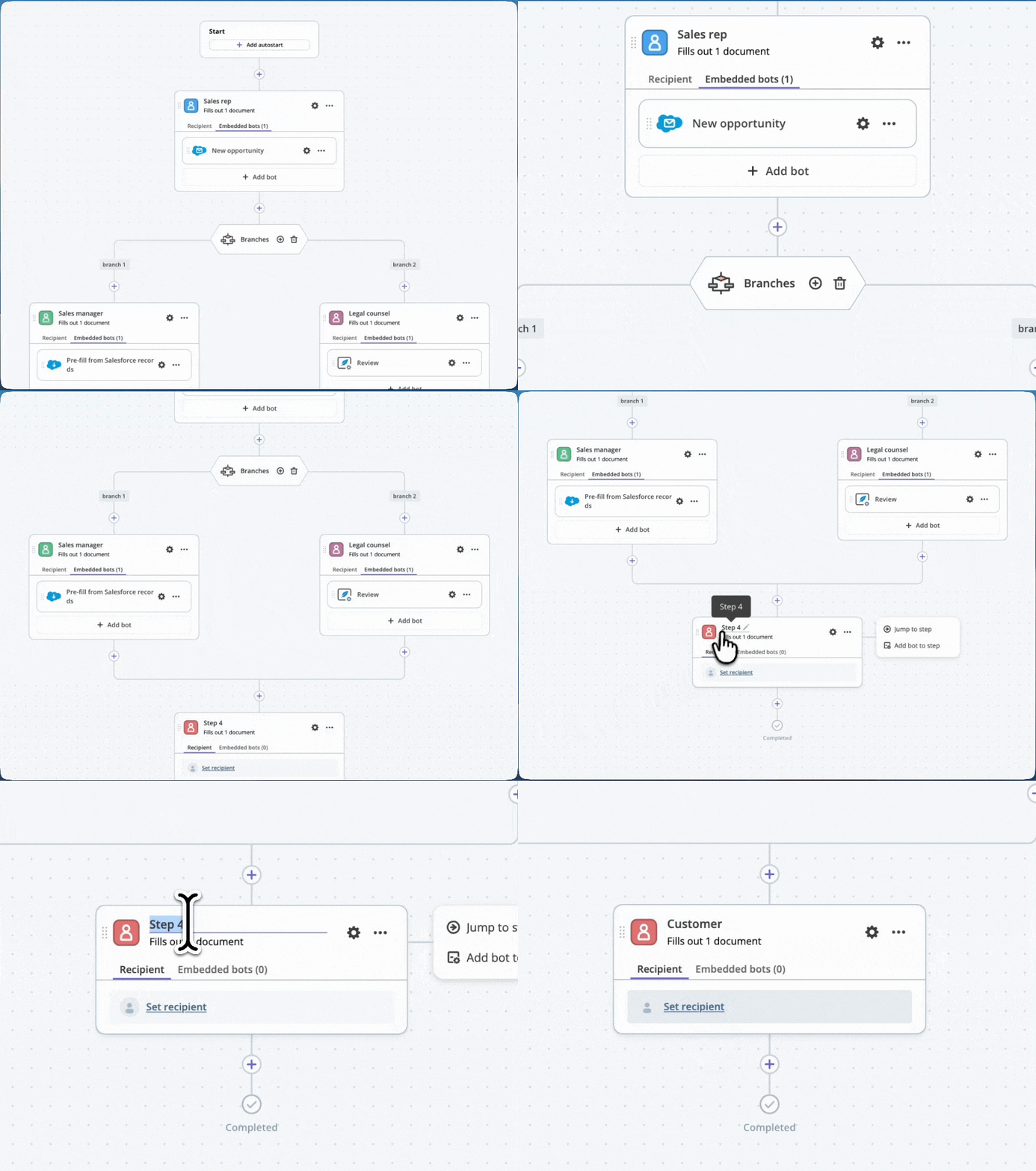
What workflow automation actually looks like in practice: a visual map of every step, condition, and approval that moves a document from creation to closeout. Operations teams build, edit, and reroute these flows without filing an IT ticket.
The 5 Processes that Benefit Most From BPA
When deciding which automation category is right for you, consider:
- What your organizational priorities are
- Which areas of your business are most likely to benefit from automation
- What the financial and productivity impact would be from automating
To help you zero in on if and how you'd benefit from BPA, it's worth understanding five processes that are commonly optimized using this type of automation.
1. Finance and Accounting
BPA tools are used to save time and increase efficiency related to invoice processing, accounts payable and receivable, employee expenses, and financial reporting.
2. HR
Implementing BPA tools can have a significant positive impact on HR departments, improving employee onboarding, automating payroll, tax deductions, and benefits administration, and streamlining employee time-off requests.
3. Sales and Marketing
BPA tools can help speed up sales and marketing cycles by automatically scoring and routing leads, updating CRM records, executing email campaigns, and kicking off contract management workflows.
4. Operations
Adopting BPA tools can help improve inventory management to ensure inventory matches demand, automate the entire end-to-end order fulfillment process, and streamline vendor onboarding and purchasing.
5. IT and Customer Service
BPA tools are widely used across IT and service desks to automate ticket routing and prioritization, assign support tickets, send automated status updates, and support customers quickly via AI.
Let's contextualize this with an example that highlights the impact of using BPA to improve a workflow.
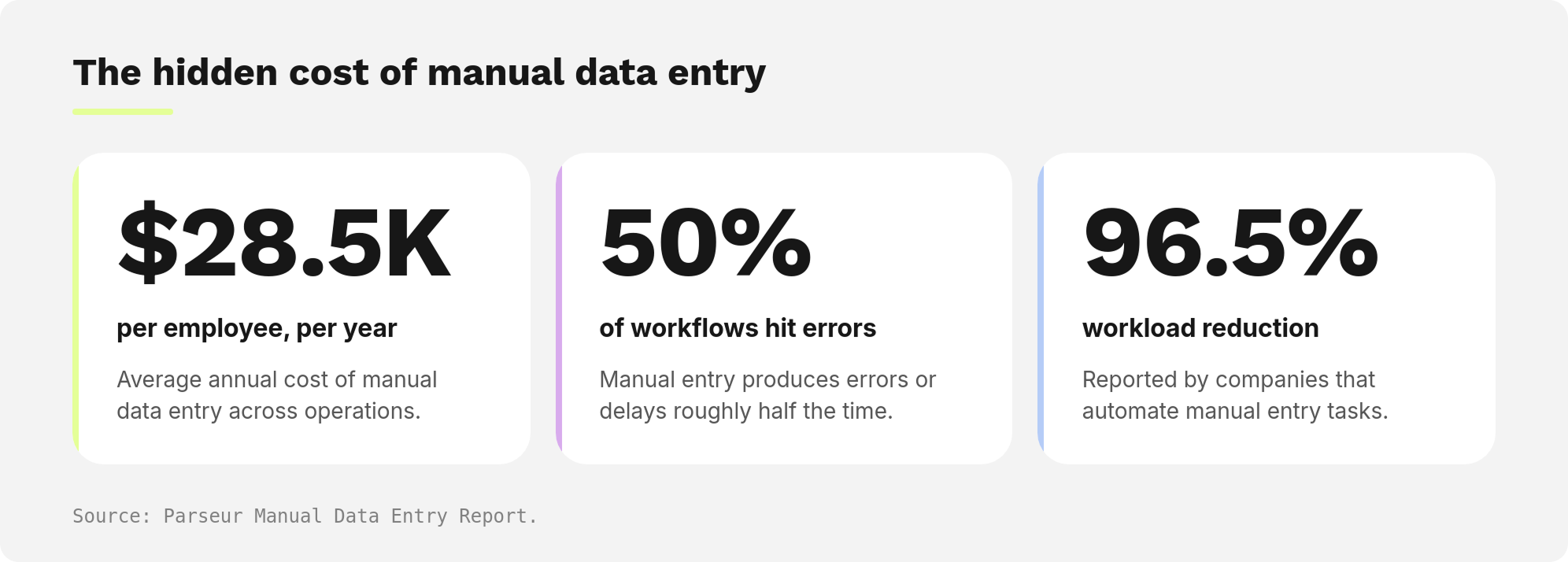
Per a Parseur report that surveyed professionals in operations, finance, administration, IT, and customer support, manual data entry tasks cost an average of $28,500 per employee per year. Errors and delays in these manual entry tasks occur approximately 50% of the time. However, companies that use automation report a 96.5% reduction in workload.
How does this play out for a company who relies on manual data entry to create, route, and approve contracts?
Before automation:
- Sales rep manually enters deal data into a document
- Contract is exported and shared via email
- Stakeholders review and request edits across versions
- Data is re-entered into multiple systems (CRM, billing, storage, etc)
- Final version is sent for signature
- Signed contract is manually uploaded and logged
For a 25-person team, this might look like:
| Number of employees creating contracts | 25 |
| Annual cost of manual data entry | $712,500 |
| Work impacted by errors and delays | $356,250 at risk |
Revenue slows because contracts end up stalling in inboxes, teams might duplicate work across systems, and errors create rework delays, preventing contracts from actually getting completed.
After automation:
- A contract is auto-generated from CRM data
- Pre-approved templates eliminate manual formatting
- Automated routing sends contracts to the right stakeholders instantly
- Real-time collaboration eliminates version control chaos
- Data is synced across systems automatically
- Contracts are signed, stored, and logged automatically
Manual workload is reduced by 96.5%, error rates go down significantly, cycle times are sped up, and system updates are automated.
For that same 25-person team, this now looks like:
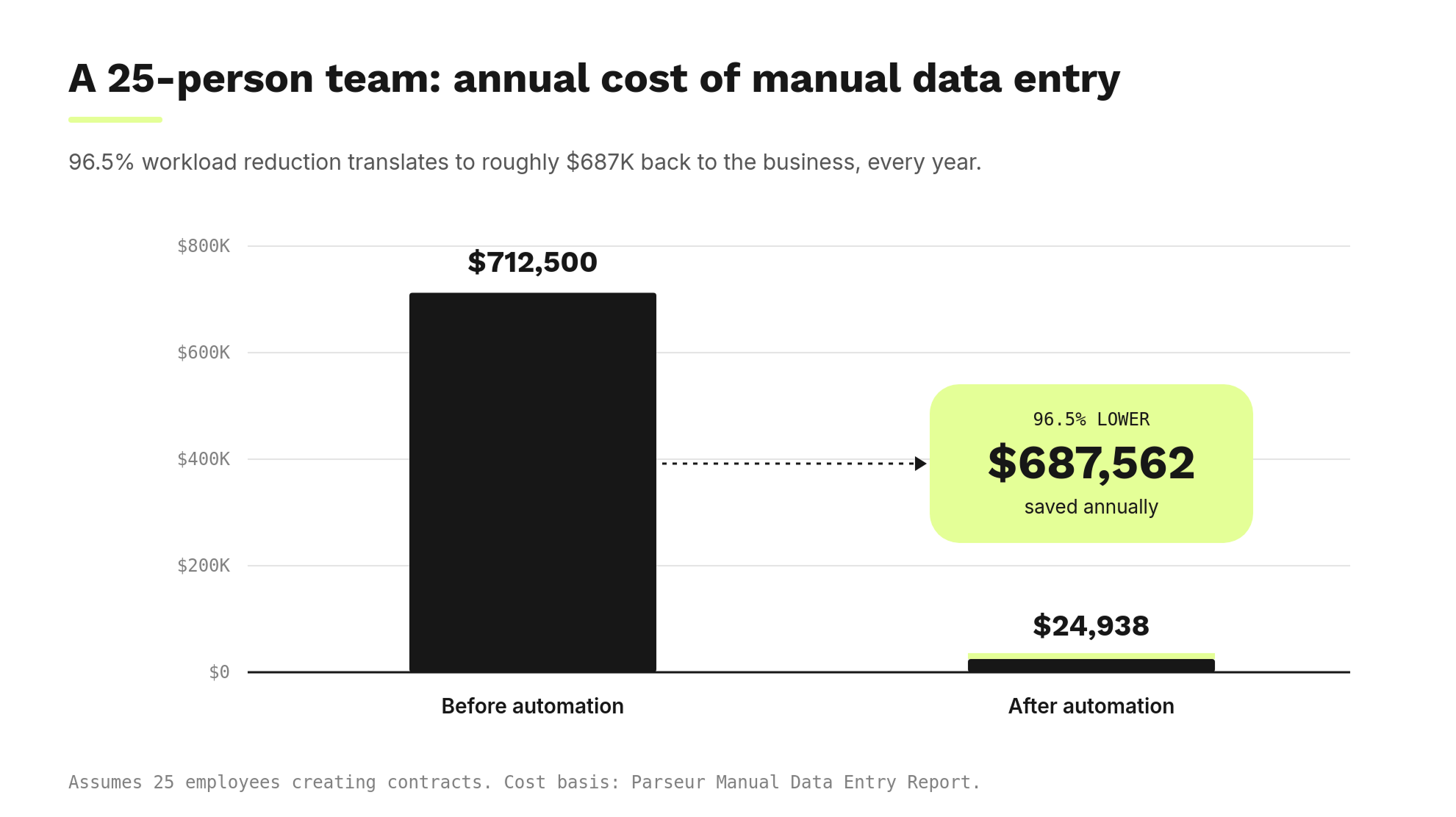
Revenue flows faster because contracts move forward automatically, errors are prevented instead of corrected, teams focus more of their time on high-value work, and deals close faster and more seamlessly.
| Before automation | After automation | |
| Manual work | High | Minimal |
| Error frequency | ~50% of the time | Exception-based |
| Cost of data entry | $712k | $25k |
| Revenue recovery speed | Delayed | Accelerated |
How to vet a BPA tool
When considering a business process automation tool for your organization, your organization's unique goals and needs must be factored in. Here are 6 questions to ask when evaluating different BPA tools:
- Is my organization ready for automation? BPA tools introduce a lot of change to organizations, so make sure leadership and colleagues recognize the need for automation and are ready to take steps towards transforming workflows.
- Which processes will we automate first? It's important to have a specific plan of action so you know what to tackle, who will be involved, and what you will measure. Try starting with high-volume, repetitive tasks, like invoicing. Create clear documentation that identifies the tasks, responsible parties, and timelines.
- What will the scope of our automation project look like? Your organization's automation maturity level should determine the scope of your project. Be realistic so you can manage resources and expectations appropriately.
- Who are our key stakeholders? Involving leaders and stakeholders will help identify the organization's needs, prioritize processes, and keep project owners accountable.
- What goals do we hope to achieve by adopting automation? Set measurable goals for each step in your automation process to focus efforts and sync results to expectations. Goals could be a reduction in error rates, improvement in customer satisfaction scores, or shorter contract cycles.
- How can we support our employees as we transition to an automation-focused approach? Changes and transitions can be tough on employees, so ensure you're providing adequate support to allow them to adjust. For a smooth transition, help employees see the benefits of automation, train them on the BPA tools you adopt, and make sure they are comfortable with what they've learned.
Choose native platform capabilities for Salesforce-anchored organizations
While RPA or iPaaS tools can deliver favorable results for organizations looking to optimize their processes, they often require complex IT involvement or fail to address the entire document lifecycle.
Focus on a BPA tool that has native platform capabilities, versus stitching together functions from various BPA tools. A tool with native platform capabilities means that automation, document workflows, data, and integrations all live in one system, which offers a high level of value.
When automation is native to the BPA platform you choose, you:
- Eliminate the costs and time associated with tool sprawl
- Automate entire workflows instead of just parts of the process
- Have reliably updated data everywhere and a single source of truth
- Drastically reduce error rates, meaning less rework and speedier cycles
- See a faster time to value; Salesforce reports that 75% of leaders who have implemented automation see time-savings equivalent to 4 hours per 40-hour workweek
- Improve cross-functional collaboration and visibility
- Scale without needing to take on new tools or add headcount
- Boost ROI thanks to cost savings from tool consolidation, productivity gains, revenue acceleration, and reduced leakage from fewer errors
For document-driven organizations that are using Salesforce, the right BPA tool can act as the connective tissue that takes Salesforce from a system of record to a system of execution. Without BPA, a Salesforce-centric team relies on:
- Document generation tools
- Approval tools
- eSignature tools
- Integration connectors
- Manual updates
With BPA, document lifecycles go from fragmented to a continuous workflow.
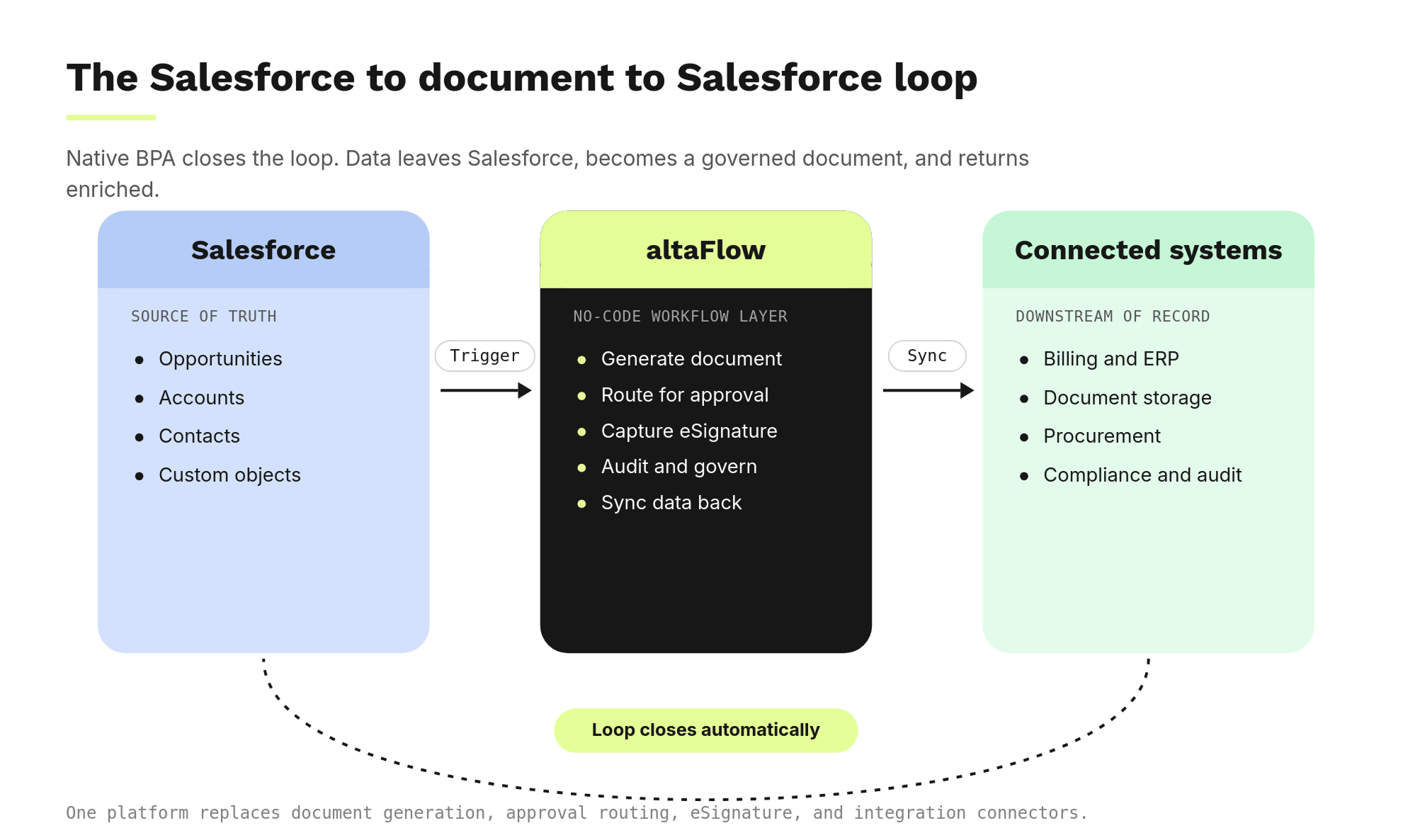
When BPA is native to a Salesforce-anchored stack, deals move forward without manual intervention, eliminating delays, errors, and disconnected workflows.
Prioritizing ROI: Which processes deliver the highest returns?
Automation and generative AI have unlocked massive potential for business organizations. According to McKinsey's research, generative AI could add $2.6-4.4 trillion to the global economy annually. This is a signal that the world is ready for automation and intelligence in all its formats.
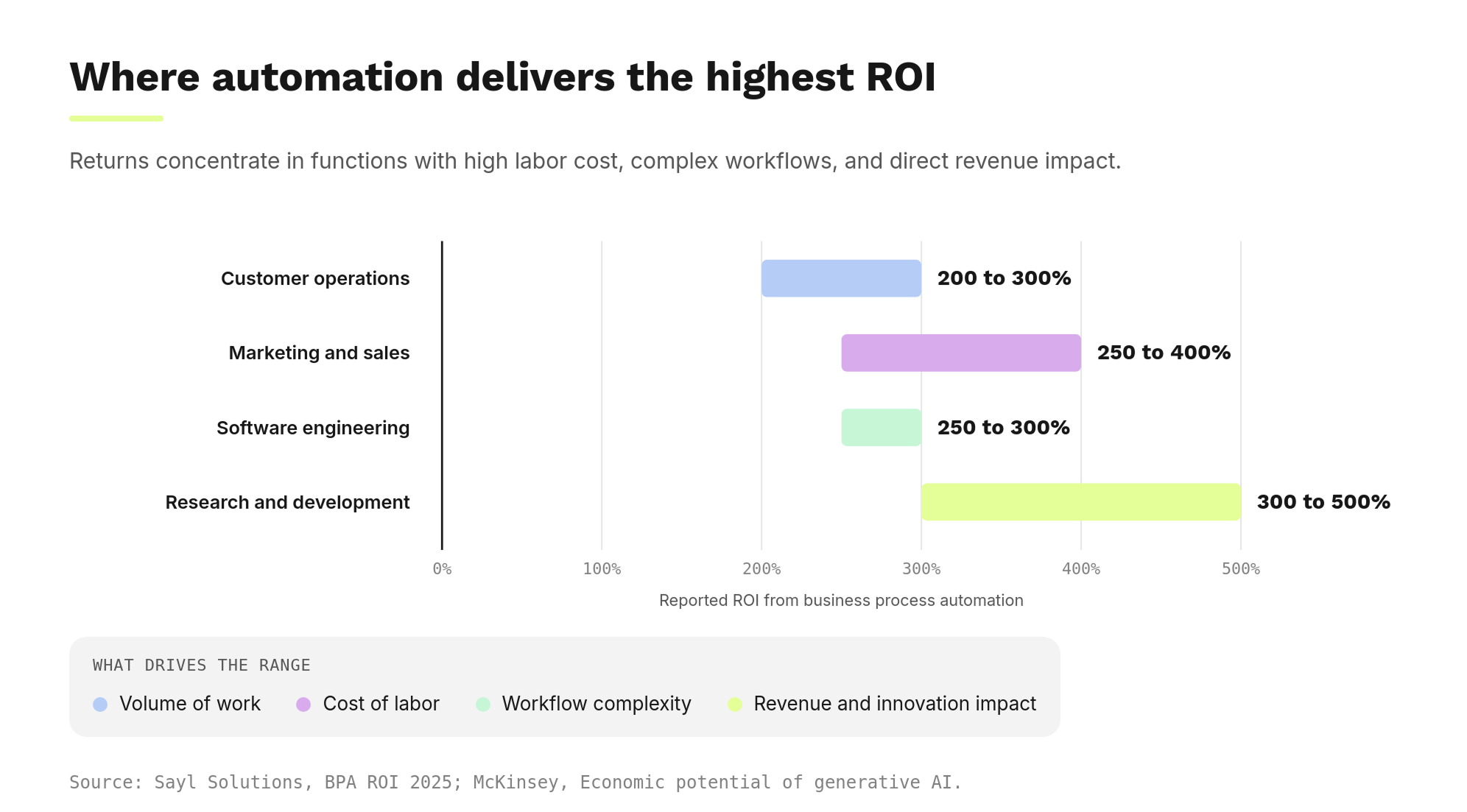
That same research report found that intelligent automation has a significant impact across all industry sectors, with the highest impact felt in four specific areas:
- Customer operations
- Marketing and sales
- Software engineering
- Research and development
Work automation is expected to grow labor productivity up to 3% annually, which will leave time for talented workers to focus on business-growth tasks and upskilling.
Though McKinsey's data places a focus on generative AI, it paints an important picture about the role automation is playing in our rapidly transforming workforce.
Leaders can safely assume that making the switch to automation will result in high ROI as error delays, contract cycle times, and manual tasks decrease dramatically. Projections show that organizations are seeing 200-500% ROI from business process automation, with the highest returns concentrated in functions that combine high labor costs, complex workflows, and direct impact on revenue or innovation.
In summary: Modernize your workflow infrastructure to unlock significant ROI
If your organization is struggling with manual, costly, and inefficient document workflows, it's time to consider automating with the right workflow infrastructure. For Salesforce-anchored, document-driven organizations, adopting altaFlow can result in significant ROI, thanks to:
- Tool consolidation
- 40% faster contract cycles
- A dramatic reduction in manual errors
- Seamless data flow across the organization
Frequently Asked Questions
What is a BPA tool and how does it work?
A BPA (Business Process Automation) tool is software that automates manual, repetitive tasks across systems by connecting humans and technology. It connects apps, applies conditional logic (based on if/then rules), and executes tasks (like document generation and approvals) without manual intervention.
What processes should you automate first with BPA?
If you have long-term, high-volume, repetitive, manual processes that you complete many times a day using an identical process each time, it's best to automate those first, especially if those tasks involve multiple systems and stakeholders. Examples include invoice processing, contract approvals, employee onboarding, and customer request routing.
What ROI can you expect from BPA tools?
Customers who automate with altaFlow have seen a 40% reduction in contract cycle times, a 70% reduction in administrative hours, and 80% faster build time, often resulting in a 200% increase in ROI. Many organizations achieve payback within the first year.
How does BPA reduce errors and improve accuracy?
Where manual data entry is involved, human error will show up. BPA eliminates manual data entry, reducing errors and standardizing workflows. Because BPA tools follow predefined rules, execution is much more consistent and the risk of human error can be reduced by as much as 70%.
Do BPA tools replace employees?
No. BPA tools are designed to help employees be more productive and consistent, not replace them. They automate repetitive, low-value tasks and enable employees to focus on high-value, revenue-generating work like long-term strategy and customer relationships.