
Skip to content

See Our Product in Action

Curious how our platform fits your unique challenges? Let's explore how altaFlow can automate your exact workflows.

Integrations
salesforce-logo
Salesforce
Oracle-NetSuite-Logo-white
Netsuite
icons8-sharepoint
SharePoint

Connect Your Entire Workflow

From Salesforce and NetSuite to SharePoint and beyond. Let’s discuss how our integrations can unify your systems.

Put Our Knowledge to Work

Go beyond templates and see what's possible. Let's talk about how our insights can power your success.

Capture Data Faster with Automated Web Forms

Build branded forms, automate routing, and sync submissions directly to Salesforce without writing a line of code.
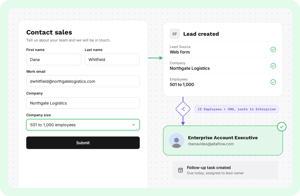


Capture clean data - Hover

Forms That Work as Hard as Your Team

Your team spends hours chasing form submissions, rekeying data, and routing requests to the right people. It slows everything down. altaFlow transforms web forms into automated workflows that capture clean data, route it instantly based on your rules, and sync every submission directly to Salesforce, NetSuite, or Microsoft Dynamics. The result: faster response times, fewer errors, and teams free to focus on work that matters.

Why Choose altaFlow for Web Forms?

No-Code Form Builder Design professional, branded forms with drag-and-drop simplicity. Add conditional logic, validation rules, and dynamic fields without IT involvement.  
Automated Routing and Approvals Route submissions to the right teams automatically based on form responses. Trigger approval workflows, notifications, and follow-up tasks instantly.  
Clean Data from the Start Built-in validation ensures submissions are complete and accurate before they reach your systems. Reduce rework and eliminate back-and-forth.  
Flexible Templates for Every Use Case Start with pre-built templates for onboarding, intake, registrations, and requests. Customize every element to match your brand and process.  
Enterprise-Grade Security Protect sensitive data with SSO, role-based access, encryption, and full audit trails. Meet compliance requirements across regulated industries.  
Native CRM Integration Sync form submissions directly to Salesforce records, NetSuite entries, or Dynamics objects. No middleware, no manual imports, no delays.  

How It Works

Step 1

Build Your Form

Use the drag-and-drop builder to create forms with your branding, conditional logic, and required fields. No coding required.

Step 2

Connect Your Systems

Map form fields to Salesforce objects, configure routing rules, and set up automated notifications and approvals.

Step 3

Launch and Automate

Deploy your form via link, embed, or QR code. Every submission triggers your workflow automatically, from data capture to CRM update.

Who Benefits from altaFlow Web Forms?

working-together-min
Human Resources

Streamline employee onboarding, benefits enrollment, and internal requests. Automate approvals and route forms to the right managers without manual forwarding.

business-meeting-min
Sales Teams 

Capture lead information directly into Salesforce. Trigger follow-up tasks, route qualified leads to reps, and eliminate data entry between systems.

 

operations-manager
IT and Platform Owners

Deploy a governed solution without custom code. Native integrations with Salesforce and NetSuite mean fewer point solutions to maintain and fewer data sync failures to troubleshoot.

 

figuring-it-out-min
IT and Platform Owners 

Reduce support tickets and development requests. Empower teams to build their own forms while maintaining governance and data quality.

 

interview-1
Education and Registrar

Automate student applications, course registrations, and document requests. Reduce processing time and ensure complete submissions every time.



solution-help-min
Finance and Operations 

Standardize vendor onboarding, invoice requests, and expense submissions. Route approvals based on amount thresholds and department rules.

Questions & Answers

Does altaFlow integrate with my CRM?

Yes. altaFlow connects natively with Salesforce, NetSuite, and Microsoft Dynamics. Form submissions sync directly to your records without middleware or manual imports. Data flows both ways, so you can pre-fill forms with existing CRM data.

Do I need coding skills to build forms?

No. altaFlow's drag-and-drop builder lets anyone create professional forms with conditional logic, validation, and branding. Your team can design and deploy forms without involving IT or developers.

Is altaFlow secure enough for sensitive data?

Absolutely. altaFlow provides SSO, role-based access control, encryption, and complete audit trails. The platform supports HIPAA compliance and meets enterprise security requirements across regulated industries.

Can I automate what happens after form submission?

Yes. altaFlow turns every form into a workflow. Submissions can trigger approval routing, notifications, document generation, eSignature requests, and CRM updates automatically based on your business rules.

How quickly can I get started? Most teams deploy their first automated form within hours. altaFlow includes templates for common use cases, and our team provides onboarding support to ensure your workflows run smoothly from day one.

Turn Every Form into an Automated Workflow

See how altaFlow captures data, routes approvals, and syncs to Salesforce without code. Book a personalized demo with our team.

8 1