Skip to content

See Our Product in Action

Curious how our platform fits your unique challenges? Let's explore how altaFlow can automate your exact workflows.

Integrations
salesforce-logo
Salesforce
Oracle-NetSuite-Logo-white
Netsuite
icons8-sharepoint
SharePoint

Connect Your Entire Workflow

From Salesforce and NetSuite to SharePoint and beyond. Let’s discuss how our integrations can unify your systems.

Put Our Knowledge to Work

Go beyond templates and see what's possible. Let's talk about how our insights can power your success.

Desktop - 1
altaFlow Mobile App

Run document workflows, fill forms, and e-sign from anywhere

altaFlow is workflow infrastructure for document-driven operations. The mobile app puts the full document lifecycle in your hand. Start a workflow, route an approval, sign a contract, and check status without waiting to get back to your desk. Same platform, same governance, now mobile.


altaFlow-mobile-app-hero

Why teams keep altaFlow on their phone

Work that does not wait Keep approvals, signatures, and workflows moving while you are away from the desk.  
The full lifecycle, not just signing Generate, route, approve, sign, and track. This is the workflow layer, not a standalone e-sign app.  
Governed by default Every action carries the same audit trail and access controls your team relies on at the desktop.  

Trusted by innovative companies

Everything you do at your desk, now in your pocket

01 Run and manage workflows

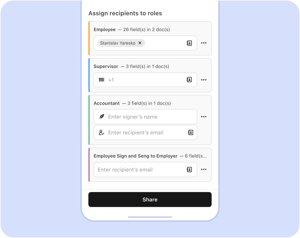
Keep work moving when you are away from the desk

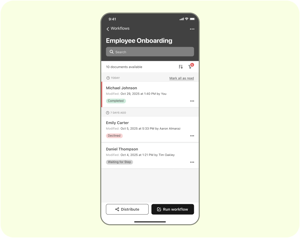
Start, monitor, and manage document workflows straight from your phone. Move an approval forward, nudge a stalled step, and keep processes running between meetings, on a job site, or in transit. The work does not stall just because you stepped away from your laptop.

  • Fill forms and documents digitally on mobile
  • Capture legally binding e-signatures with a full audit trail
  • Review and download completed documents anytime
run-workflows
Fill and e-sign documents

Sign and fill on the spot

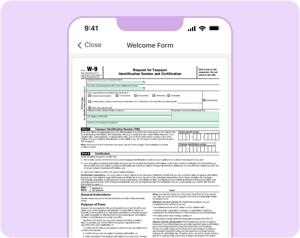
Fill out forms and capture legally binding e-signatures directly in the app. Complete a document while it is in front of you instead of flagging it for later. Signing is the final step of a governed workflow here, not a disconnected task, so every signed document stays tied to the process it belongs to.

  • Fill forms and documents digitally on mobile
  • Capture legally binding e-signatures with a full audit trail
  • Review and download completed documents anytime
sign-fill
Track status and stay in control

Know where every document stands

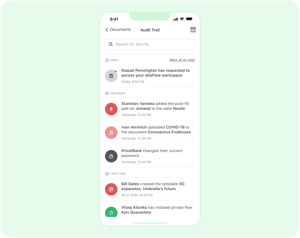
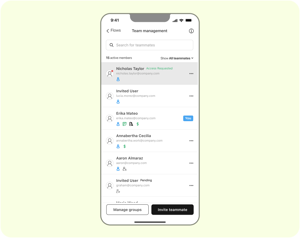
See the status of every document across your processes at a glance. Open completed documents, download what you need, and follow each workflow action through a complete audit trail. Manage who can access each workflow and bring teammates in without leaving the app.
track-status

The same platform your operations run on

The mobile app is not a lighter, separate product. It is the same altaFlow platform, governed end to end, with the work you do on your phone syncing back to the same workflows and records your team manages at the desktop. Your documents move, your data follows, and your compliance holds.

Generate. Route. Approve. Sign. Sync. Govern.
platform

30% less

AltaFlow costs 30% less than DocuSign, Conga, and PandaDoc on average*

80% faster

Automations that took 100+ hours now take 20–30 with AltaFlow*

3 tools → 1

Replace your document generation, e-signing, and workflow tools with a single platform*

2x ROI

AltaFlow customers typically see 2x+ return through lower licensing, faster automation, and fewer tools*


Real customer success

Anthony MateroOperations

"The flexibility of altaFlow allowed us to design a workflow that works for us. The automation built into altaFlow helped us remove many manual steps in our old process."

5/5 on G2 and Capterra
Michael MooreInsurance Advisor

"altaFlow has been a great addition to our business! It integrates well with Salesforce allowing our team to seamlessly get custom documents ready for signatures within our Salesforce record!"

5/5 on G2 and Capterra
Jeffrey Rader Information Technology Director

"altaFlow simplified our paperwork, giving our team the freedom to focus on what drives real value in our business."

5/5 on G2 and Capterra

Frequently Asked Questions

Is the altaFlow app free to download?

es. The app is free to download from the App Store and Google Play. You sign in with your existing altaFlow account to access your workspace and workflows.

I used the airSlate app before. Do I need a new account?

No. altaFlow is the new name for airSlate. Your login, workspace, documents, workflows, and account settings remain unchanged. Update the app and sign in as usual.

Can I e-sign documents on my phone?

Yes. You can fill forms and capture legally binding e-signatures in the app, with a complete audit trail attached to each document.

What can I do in the mobile app?

Run and manage workflows, fill and e-sign documents, invite and manage teammates, track document statuses, review and download completed documents, follow an audit trail of every action, and manage access permissions for each workflow.

Does the mobile app stay in sync with the desktop platform?

Yes. The app runs on the same governed altaFlow platform, so work you complete on mobile moves through the same workflows and updates the same records as the desktop experience.

How do I get help or share feedback? Reach out at support@altaflow.com with any questions or suggestions.