Skip to content
Legal

Take a client's information once. Every document after that fills itself.

altaFlow builds the intake form, the engagement letter, and the conflict questionnaire from information your forms already collected, routes each one for signature, and files the result where your firm keeps its matter records.
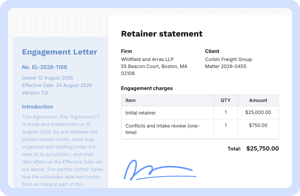
altaflow-legal-firms-sign-retainer-statement

30% less

vs. DocuSign, Conga, and PandaDoc

5 tools in 1

DocGen, PDF editing, workflow automation, contract management, and eSignature

80% faster

Automations reduced from 100+ hours to 20 to 30

2x ROI

Through lower licensing, faster automation, and fewer tools

What intake, legal operations, and practice managers stop doing by hand

Staff stop typing the same information twice.

Take a client's information down once and trust it is right everywhere we keep it.

The intake form writes straight into the matter record, so the signed engagement letter and the file never disagree about the parties, the scope, or the rate.

Workflows

  • Matter intake and new client forms
  • Conflict check questionnaires
  • Client information updates
 
Work that waited days finishes in minutes.

Get everything signed by everyone who needs to sign, without chasing people all week.

Engagement letters route to the client and the responsible attorney in order, remind the ones who stall, and let anyone answer where a document stands in seconds.

Workflows

  • Engagement letters and fee agreements
  • Non-disclosure agreements
  • Outside counsel and vendor onboarding
 
A rate or policy change reaches the paperwork the same day.

Get paperwork done with our own people instead of waiting on a developer or the vendor.

Conditional logic and dynamic tables build the right document in one pass, so a rate change or a new practice area updates one workflow instead of a folder of near-duplicate letters.

Workflows

  • Rate and fee schedule updates
  • Practice-specific engagement terms
  • Policy attestations
 

Where the matter actually stalls before it starts


A prospective client fills out an intake form, and a paralegal types the same answers into the matter record that afternoon.
An engagement letter sits for four days because nobody can say whether it is waiting on the client or the responsible attorney.
A malpractice carrier asks for signed engagement terms on a closed matter, and someone spends a day searching email.

From the first intake form to the filed matter record

Step 1

Capture

altaflow-legal-in-house-capture-contract-review-request

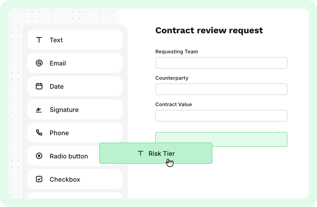
A prospective client or an intake coordinator completes a branded form on any device, and conditional fields hide every question that does not apply to that practice area.

Step 2

Generate

altaflow-legal-in-house-generate-master-services-agreement

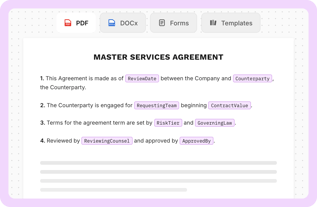
altaFlow assembles the engagement letter and related documents from what was submitted, pulling the right scope language, fee terms, and rate tables for that matter.

Step 3

Route and sign

altaflow-legal-in-house-route-master-services-agreement

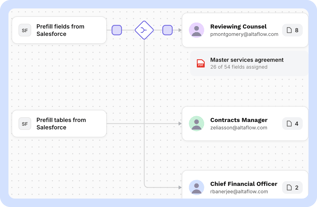
Internal review runs before anything goes to the client, then each signer receives the document in order with reminders.

Step 4

Write back

altaflow-legal-in-house-write-back-opportunity-record

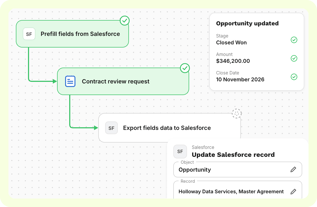
The completed document and its data land in the matter record, filed where your records team already looks for them.

Build

Webforms

Branded intake and conflict forms with field-level conditions, so a prospective client answers only what applies to their matter.

Document Generation

Engagement letters, fee agreements, and non-disclosure agreements built from prefilled data, with practice-specific and jurisdiction-specific sections appended automatically.

E-sign & Fill out

Multi-step signing on any device, in close to 30 languages, with a legally binding signature record behind every completion.

Automate

Workflow Configuration

Conditional steps and built-in approval gates, so a matter above a value threshold routes to the responsible partner before the letter reaches the client.

Automation Bots

Pre-fill bots populate every document in an engagement packet from the same intake, and scanned data extraction reads an uploaded identification document.

Notifications and Reminders

Real-time alerts when a letter is viewed or signed, scheduled follow-ups, and action-ready links on the ones that stall.

Integrate

Native CRM Integrations

Two-way sync with your customer relationship management system, Salesforce, Microsoft Dynamics 365, or NetSuite. Completed documents update the existing record or create a new one.

Integration Bots

Governed data and document movement into document management and practice systems, with payment collection available inside the intake form for retainers.

APIs for Developers

A documented application programming interface, so intake, generation, and signature can be embedded into a client portal your firm built.

Manage

Document Tracking and Audit

Real-time status on every engagement document and a complete activity log with the signer, the internet protocol address, and the timestamp.

Branding and Customization

Branded signing pages, fully editable step-level emails, and a custom sending domain, so a client recognizes the firm before they click.

Team and Access Management

Granular roles, teams, and workspaces per practice group, so each group runs its own workflows under one standard.

It writes back to the systems you already run

Whichever system the process lives in, the finished document and its data go back there.

Start Fast with Prebuilt Law Firm Workflow Templates

Security at the core

Enterprise-grade security and compliance

SSO, role‑based access, audit trails, data retention, and encryption. Built to support regulated use cases with governance across every workflow.


Don't take our word for it

Verified results from teams running document-driven operations on altaFlow.

Ecustomer-logo
James CraigDirector of IT

NewSchool of Architecture & Design

"Our campus-wide adoption of altaFlow has completely transformed how we handle approvals and contract workflows. The platform integrated seamlessly with our existing systems, eliminating bottlenecks and saving us hundreds of hours each term. For a team with limited IT resources, automation has been a game-changer."

Ellipse 1
Mandy HoffmanBusiness Operations Manager

T2 Biosystems

"altaFlow has truly streamlined our document-heavy processes. With its seamless integrations into our existing stack, we've been able to automate workflows and reduce manual effort significantly. Compliance audits, which once took weeks, are now completed in just days. This level of efficiency and security gives us confidence in scaling."

IATDE-Logo-RGB
Mark McNicholDirector

In At The Deep End

“I like the best the fact that the software is so simple to use yet so powerful. With a few clicks of a button, you can create multipage/document forms that are pre-populated based on information users already supply. The fact that somebody only needs to enter their name once and it replicates throughout the whole system is just amazing.“

Frequently Asked Questions

Which document and practice management systems do you integrate with? altaFlow connects natively to Salesforce, Microsoft Dynamics 365, and NetSuite, and through integration bots to Microsoft 365, SharePoint, and Google Workspace. For a document management or practice management system, the connection is built against the interface your firm already exposes, and the signed document plus its data are filed against the matter. Bring your system to the demo and we will show the write-back running.
Can intake forms differ by practice area? Yes. Field-level conditions show, hide, or require questions based on what the prospective client answers, and entire documents can appear only when they are relevant. One intake workflow covers every practice group.
Who builds and changes the engagement letter templates? Legal operations, in a drag-and-drop builder, with no code. Conditional logic and dynamic tables mean a rate change or a new practice area updates one workflow rather than every letter that quotes it.
Can a partner review before anything reaches the client? Yes. Built-in approval gates run inside the workflow, so a matter above a threshold routes to the responsible partner before the engagement letter goes out for signature.
What evidence do we have if a client disputes a signature? Every signature carries the signer, the internet protocol address, and the timestamp in a complete audit trail, and version control means only the current letter could have been signed. The record is assembled as the work happens.
Can we collect a retainer on the intake form? Yes. A payment field can be added to any web form, handling one-time charges or recurring amounts, so a retainer is collected at the moment the client completes the document.
How is it priced? Do we pay per signature? No. Pricing is a site license with unlimited users, so a busy intake month does not raise the bill and nobody has to ration signatures. Per-envelope pricing does the opposite: the meter tells you to send fewer documents in exactly the weeks you need to send more.
We already have an eSignature tool. What does altaFlow replace? Signature is the last step, not the process. altaFlow covers five capabilities in one platform: document generation, PDF editing, workflow automation, contract management, and eSignature, at 30 to 40% less than the incumbent stack. If you want to keep the signature tool you already run, ask about the integration path in the demo, because it depends on the tool.

Bring the engagement letter that takes your team the longest.

In thirty minutes we build it, run it, and show you the signed document filed against the matter.

60