
Skip to content

See Our Product in Action

Curious how our platform fits your unique challenges? Let's explore how altaFlow can automate your exact workflows.

Integrations
salesforce-logo
Salesforce
Oracle-NetSuite-Logo-white
Netsuite
icons8-sharepoint
SharePoint

Connect Your Entire Workflow

From Salesforce and NetSuite to SharePoint and beyond. Let’s discuss how our integrations can unify your systems.

Put Our Knowledge to Work

Go beyond templates and see what's possible. Let's talk about how our insights can power your success.

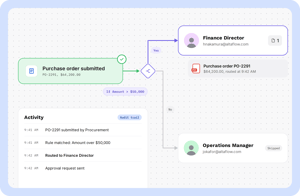
Route Documents to the Right People, Automatically 

Eliminate manual forwarding with intelligent routing that moves documents through approvals, reviews, and signatures based on your rules.


altaflow-workflow

Smarter Document Routing for Faster Decisions

Every day, critical documents stall because someone forgot to forward an email or missed a Slack message. Manual routing creates bottlenecks, delays approvals, and leaves teams guessing about status. altaFlow automates document routing with conditional logic that sends the right document to the right person at the right time.

Define your rules once, and watch contracts, forms, and approvals move through your organization without manual intervention. Teams using automated routing typically cut approval cycle times by 40% or more while maintaining complete visibility into document status.

Why Choose altaFlow for Document Routing?

No-Code Route Configuration Build complex routing rules with a drag-and-drop interface. Set conditions based on document type, value thresholds, departments, or any field in your workflow. No developers required.  
Conditional Logic That Adapts Route documents differently based on contract value, approval type, or signer role. Skip unnecessary steps automatically. Your routing rules flex to match how your business actually works.  
Real-Time Status Visibility Know exactly where every document sits in the routing chain. Get instant notifications when documents arrive, are approved, or require escalation. No more status update emails.  
Sequential and Parallel Routing Send documents through one-by-one approval chains or to multiple reviewers simultaneously. Combine both approaches in a single workflow for maximum efficiency.  
Audit Trails for Compliance Every routing action is logged with timestamps, user identity, and decision outcomes. Meet compliance requirements with complete documentation of who touched what and when.  
Native CRM and ERP Integration Route documents based on data from Salesforce, NetSuite, or Microsoft Dynamics. Pull record information to determine routing paths automatically without manual lookups.  

How It Works

Step 1

Define Your Routing Rules  

Use the visual workflow builder to create routing paths. Set conditions that determine which approvers see which documents. Add parallel branches, sequential steps, and automatic escalations based on your requirements.

Step 2

Connect Your Data Sources

Link your routing workflow to Salesforce, NetSuite, or other systems. Pull record data to inform routing decisions. Documents automatically populate with the information approvers need to make decisions.

Step 3

Launch and Monitor

Activate your routing workflow and watch documents flow to the right people automatically. Track progress in real time, receive notifications on completions, and access full audit trails for compliance reporting.

Who Benefits from Document Routing Automation?

working-together-min
Business Operations  
Operations teams spend hours chasing document status and forwarding files manually. Automated routing eliminates this overhead, letting teams focus on strategic work instead of administrative coordination. Track every document from submission to completion.

 

business-meeting-min
Legal Teams 

Contract reviews require precise routing through legal, compliance, and executive approvers. altaFlow ensures the right eyes see each agreement in the correct order, with escalation rules that prevent documents from stalling in review queues.



operations-manager
Human Resources

Employee onboarding, policy acknowledgments, and benefits enrollment require documents to reach multiple departments. Automate routing to ensure new hires complete paperwork on time while HR maintains visibility into progress.

 

figuring-it-out-min
Finance and Accounting 

Invoice approvals, purchase orders, and expense reports need routing based on amount thresholds and cost centers. Set value-based rules that automatically escalate high-value items to senior approvers while routine items flow through faster paths.



interview-1
Sales Teams 

Quotes and proposals stall when sales reps wait for pricing approval or legal review. Automated routing accelerates deal velocity by moving documents through internal approvals the moment they are ready, then directly to customers for signature.



solution-help-min
IT and Platform Owners 

Standardized routing reduces support tickets and data inconsistencies. IT teams benefit from governed workflows that enforce compliance policies automatically, with complete audit logs for security reviews and regulatory requirements.


Questions & Answers

Does altaFlow integrate with Salesforce for document routing?

Yes. altaFlow offers native Salesforce integration that allows you to route documents based on record data, opportunity values, account types, or any custom field. Documents can be launched from any Salesforce object and routing decisions can pull data directly from your CRM.

Do I need coding skills to set up document routing workflows?

No coding is required. altaFlow provides a visual drag-and-drop builder where you define routing rules, add conditions, and configure approver assignments. Business teams can create and modify routing workflows without IT involvement.

How does altaFlow handle compliance and audit requirements for document routing?

Every routing action is logged with timestamps, user identity, IP address, and decision outcomes. altaFlow maintains complete audit trails that satisfy regulatory requirements. Features include SSO, role-based access control, and configurable retention policies.

Can I set up routing rules based on document values or thresholds?

Absolutely. You can configure conditional routing based on any field value in your workflow. Common examples include routing contracts over a certain dollar amount to executive approval, or sending documents to different departments based on product type or region.

What happens if an approver is unavailable or misses a routing deadline? altaFlow supports automatic escalation rules and deadline reminders. Configure backup approvers, set SLA thresholds, and enable automatic reassignment when documents remain unactioned. Managers receive alerts when items approach or exceed deadlines.

Stop Chasing Documents and Start Routing Automatically 

See how altaFlow eliminates manual forwarding and accelerates approvals. Book a personalized demo with our team to explore routing automation for your workflows. 

8 1