Skip to content

See Our Product in Action

Curious how our platform fits your unique challenges? Let's explore how altaFlow can automate your exact workflows.

Integrations
salesforce-logo
Salesforce
Oracle-NetSuite-Logo-white
Netsuite
icons8-sharepoint
SharePoint

Connect Your Entire Workflow

From Salesforce and NetSuite to SharePoint and beyond. Let’s discuss how our integrations can unify your systems.

Put Our Knowledge to Work

Go beyond templates and see what's possible. Let's talk about how our insights can power your success.

Desktop - 1
AI Assistant

See inside your document workflows. No IT required.

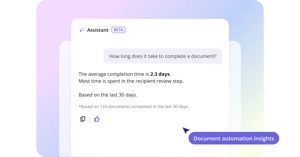
Operations leaders and IT architects spend cycles building reports, exporting data, and analyzing spreadsheets. Meanwhile, workflow bottlenecks hide in plain sight. The documents are moving. The data is there. You just can't see it easily. altaFlow's AI Analytics Chat turns workflow data into instant insights. No exports. No waiting for your analyst. No IT tickets to run a custom report. Ask a question in plain English, get a structured answer in seconds.
AI-Assistant-hero
The problem

Workflow data exists. Visibility doesn't.

What it does

Ask. Get answers. Act.

Query your workflow data in natural language. Scope answers to all documents or a specific workflow.


business-meeting-min
ASK
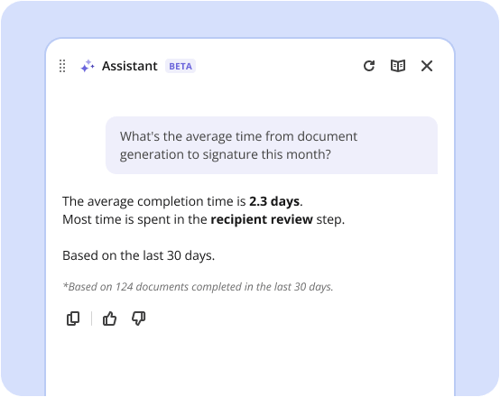
"What's the average time from generation to signature this month?"
 
GET
Average, trend vs. last month, breakdown by workflow.
 
IMPACT
Spot where contract cycles are slowing. Route that data to RevOps or Legal. Fix it.
interview-1
ASK
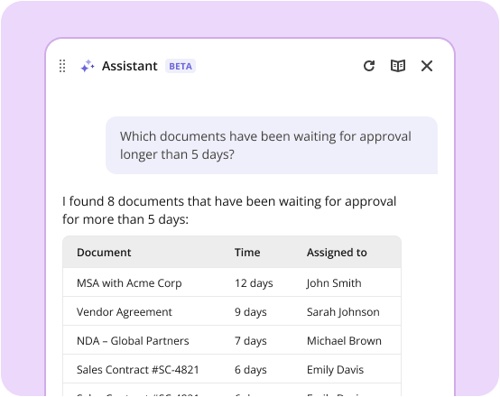
"Which documents have been waiting for approval longer than 5 days?"
 
GET
List by sender, recipient, workflow, and stuck-time duration.
 
IMPACT
Unblock approvers manually. Surface patterns. Fix approval routing.
solution-help-min
ASK
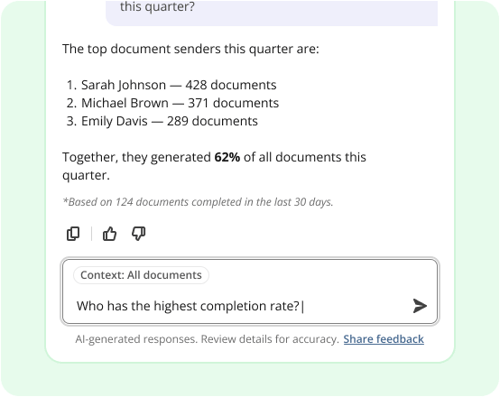
"Which senders are generating the most documents this quarter?"
 
GET
Breakdown by sender, with completion rates and average time-to-completion.
 
IMPACT
Understand which teams rely most on your automation. Optimize for highest-volume users.

vs. status quo

Not a dashboard. Not an export. A conversational analyst.

MANUAL EXPORTS
BI DASHBOARDS
altaFlow AI ASSISTANT
Setup time
Minutes each time
Weeks, if you build it
None. Ask immediately.
New questions
New export. New analysis.
Requires dev / analytics team
Type the question.
Data freshness
As fresh as your last export
Scheduled, often stale
Real-time. Queried at ask-time.
Governance
No audit trail
Query logs only
Scoped to user's existing access.
You don't need a BI platform, a dashboard architect, or an analytics export process. You need answers. Fast. To questions that change.
Built for the right people

Designed for the people who actually run workflows.

For Operations leaders

Stop asking IT for basic reports. Get cycle-time visibility without waiting for an analyst.

  • Surface bottlenecks when they matter, not days later

  • Self-serve answers instead of filing requests

  • One less tool to manage. Same platform you already use.
AI-Assistant-stuck-packages

For IT platform owners

Governed at the user level. Every answer is scoped to existing altaFlow data access.

  • No new permissions model. Uses existing RBAC.

  • Metadata queries only. No document content accessed.

  • Reduces support tickets. Ops teams self-serve.
AI-Assistant-process-health

For RevOps & Sales Ops

Contract cycle-time tracking built in. Live data from your Salesforce sync.

  • Sender activity and completion rates at a glance

  • Historical trend analysis. "Are we faster than last quarter?"

  • CRM data stays current. Answers reflect live records.
AI-Assistant-completion-time

Security at the core

Governed infrastructure. Not a black box.

The Assistant augments your operations team's ability to ask questions. It doesn't replace your need for deterministic workflow execution, audit trails, or approval chains. altaFlow's core platform stays deterministic. AI sits on top, in the analytics layer.

The same platform your operations run on

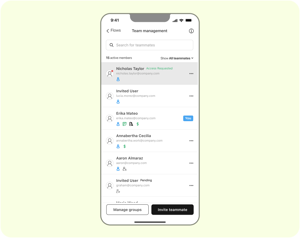
The mobile app is not a lighter, separate product. It is the same altaFlow platform, governed end to end, with the work you do on your phone syncing back to the same workflows and records your team manages at the desktop. Your documents move, your data follows, and your compliance holds.

Generate. Route. Approve. Sign. Sync. Govern.
platform

30% less

AltaFlow costs 30% less than DocuSign, Conga, and PandaDoc on average*

80% faster

Automations that took 100+ hours now take 20–30 with AltaFlow*

3 tools → 1

Replace your document generation, e-signing, and workflow tools with a single platform*

2x ROI

AltaFlow customers typically see 2x+ return through lower licensing, faster automation, and fewer tools*


Real customer success

Anthony MateroOperations

"The flexibility of altaFlow allowed us to design a workflow that works for us. The automation built into altaFlow helped us remove many manual steps in our old process."

5/5 on G2 and Capterra
Michael MooreInsurance Advisor

"altaFlow has been a great addition to our business! It integrates well with Salesforce allowing our team to seamlessly get custom documents ready for signatures within our Salesforce record!"

5/5 on G2 and Capterra
Jeffrey Rader Information Technology Director

"altaFlow simplified our paperwork, giving our team the freedom to focus on what drives real value in our business."

5/5 on G2 and Capterra

Frequently Asked Questions

Is the altaFlow app free to download?

es. The app is free to download from the App Store and Google Play. You sign in with your existing altaFlow account to access your workspace and workflows.

I used the airSlate app before. Do I need a new account?

No. altaFlow is the new name for airSlate. Your login, workspace, documents, workflows, and account settings remain unchanged. Update the app and sign in as usual.

Can I e-sign documents on my phone?

Yes. You can fill forms and capture legally binding e-signatures in the app, with a complete audit trail attached to each document.

What can I do in the mobile app?

Run and manage workflows, fill and e-sign documents, invite and manage teammates, track document statuses, review and download completed documents, follow an audit trail of every action, and manage access permissions for each workflow.

Does the mobile app stay in sync with the desktop platform?

Yes. The app runs on the same governed altaFlow platform, so work you complete on mobile moves through the same workflows and updates the same records as the desktop experience.

How do I get help or share feedback? Reach out at support@altaflow.com with any questions or suggestions.