
Skip to content

See Our Product in Action

Curious how our platform fits your unique challenges? Let's explore how altaFlow can automate your exact workflows.

Integrations
salesforce-logo
Salesforce
Oracle-NetSuite-Logo-white
Netsuite
icons8-sharepoint
SharePoint

Connect Your Entire Workflow

From Salesforce and NetSuite to SharePoint and beyond. Let’s discuss how our integrations can unify your systems.

Put Our Knowledge to Work

Go beyond templates and see what's possible. Let's talk about how our insights can power your success.

Automate Document Workflows in Microsoft 365

Microsoft 365 powers your operations, but manual document processes and disconnected tools create friction that slows your team down. altaFlow brings native document automation across Dynamics 365, SharePoint, Teams, Excel, and Outlook — eliminating manual data entry, streamlining approvals, and keeping every system in sync. No code required.
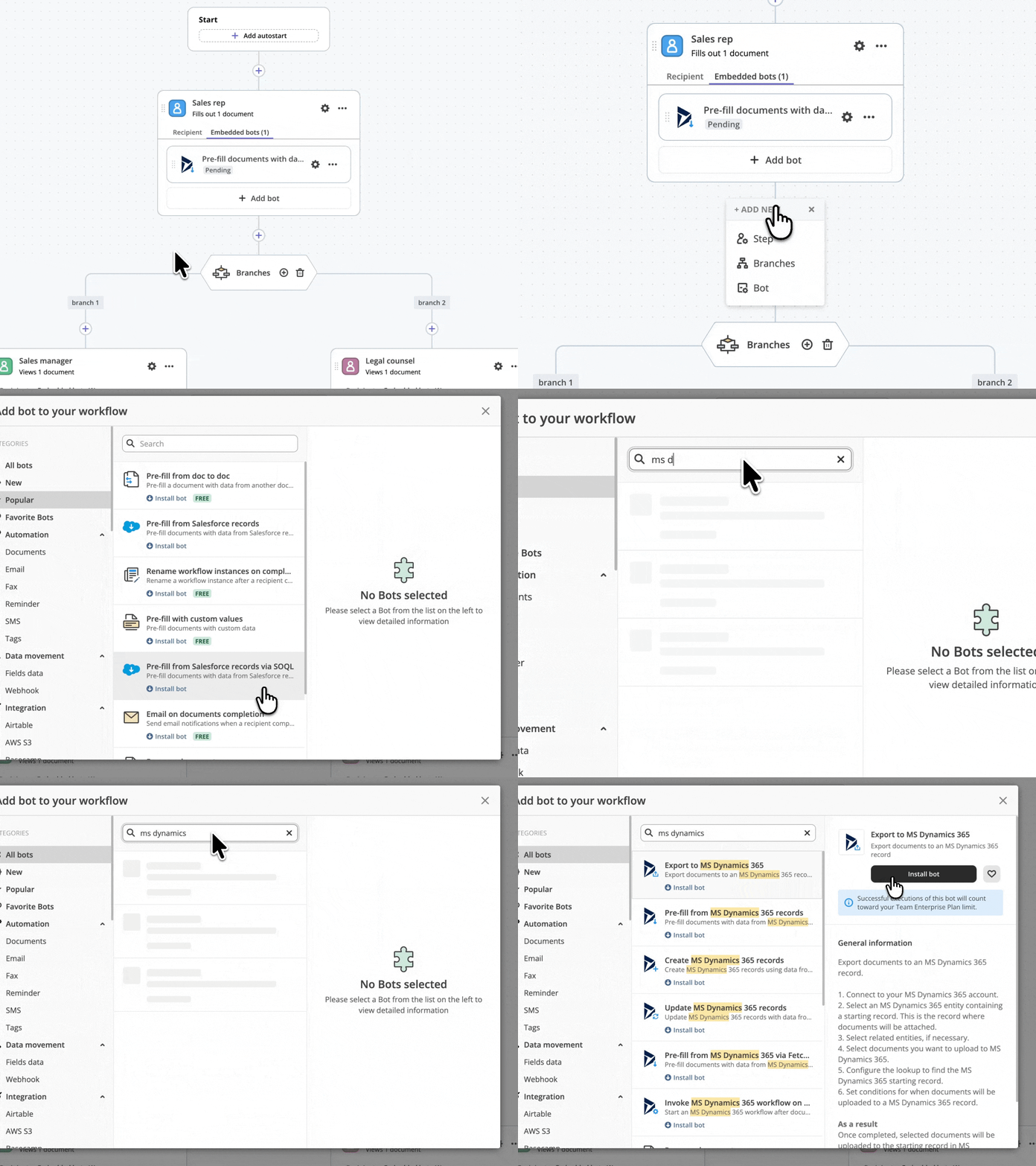
MS Dynamics

Native Microsoft 365 Integration, Zero Manual Work

altaFlow integrates natively with Microsoft 365 — including Dynamics 365, SharePoint, Excel, Teams, and Outlook — to eliminate manual data entry, streamline approvals, and keep your systems of record in perfect sync. Build no-code workflows that move data bi-directionally between altaFlow and your Microsoft environment.

Key Capabilities

Pre-fill contracts and proposals with data from Dynamics 365 records  
Export completed forms and signed documents to SharePoint folders  
Sync spreadsheet data between altaFlow documents and Excel 365  
Trigger document workflows from Microsoft Teams notifications  
Auto-update Dynamics 365 records when documents are completed  

How Does It Work?

Step 1

Connect your Microsoft 365 account to altaFlow in just a few clicks

Step 2

Select and configure the no-code Bot that matches your workflow needs

Step 3

Set your if-this-then-that conditions to control when and how the Bot runs

Step 4
Launch your workflow and let altaFlow handle the rest automatically

Why altaFlow for Microsoft 365

No-Code Configuration Set up your Microsoft 365 integration in minutes with an intuitive visual interface. No developers, no API knowledge required.  
Conditional Logic Every Bot operates on if-this-then-that logic, giving you granular control over when and how automations execute.  
Bi-Directional Data Flow Move data seamlessly between altaFlow and Microsoft 365 — pre-fill documents from records and push completed data back.  
Enterprise-Grade Security All data transfers are protected by 256-bit encryption with SOC 2 Type II, HIPAA, and GDPR compliance  

Available Microsoft 365 Bots

Bot
Description
Pre-fill from MS Dynamics 365 Records Bot
Automatically populate documents with data from your Dynamics 365 records — contacts, deals, accounts, and custom entities
Update MS Dynamics 365 Records Bot
Push completed document data back into Dynamics 365 to keep your CRM records current without manual entry
Create MS Dynamics 365 Record Bot
Automatically create new Dynamics 365 records — leads, contacts, opportunities — from completed document data
Export to MS Dynamics 365 Bot
Export completed documents and attachments directly to Dynamics 365 records
Pre-fill from MS Dynamics 365 with FetchXML Bot
Use FetchXML queries to pull precisely filtered data from Dynamics 365 into your documents
Invoke MS Dynamics 365 Workflow on Completion Bot
Automatically trigger a Dynamics 365 workflow when a document is completed in altaFlow
Archive to SharePoint Folder Bot
Automatically archive completed documents to a designated SharePoint folder for centralized storage
Export to Excel 365 Bot
Export document data to a Microsoft 365 Excel spreadsheet for reporting and analysis
Pre-fill from Excel Spreadsheet Bot
Pull data from Excel spreadsheets to pre-populate document fields automatically
Pre-fill Dropdowns from Excel Bot
Populate dropdown fields in your documents with values from an Excel spreadsheet

Questions & Answers

How does altaFlow integrate with Microsoft 365?

altaFlow connects to Microsoft 365 through pre-built, no-code Bots. You authenticate your Microsoft account, select a Bot (e.g., Pre-fill from Dynamics 365), configure your if-this-then-that conditions, and launch. Data flows bi-directionally between altaFlow and Microsoft 365 without any coding or API configuration.

Can I automatically export documents to SharePoint using altaFlow?

Yes. The Archive to SharePoint Folder Bot automatically saves completed and signed documents to your designated SharePoint folder. You configure which documents trigger the export and which folder receives them — all through a visual, no-code interface.

Does altaFlow support Dynamics 365 CRM data in document workflows?

Absolutely. altaFlow offers multiple Dynamics 365 Bots including Pre-fill from Records, Create Records, Update Records, and Export. You can pull CRM data into documents, push completed data back, and even trigger Dynamics 365 workflows upon document completion.

Is the Microsoft 365 integration secure?

All data transfers between altaFlow and Microsoft 365 are protected by 256-bit encryption. altaFlow maintains SOC 2 Type II, HIPAA, and GDPR compliance, ensuring enterprise-grade security for every document workflow.

Ready to automate your Microsoft 365 workflows?

Get started with altaFlow today — no code required.

44