
Skip to content

See Our Product in Action

Curious how our platform fits your unique challenges? Let's explore how altaFlow can automate your exact workflows.

Integrations
salesforce-logo
Salesforce
Oracle-NetSuite-Logo-white
Netsuite
icons8-sharepoint
SharePoint

Connect Your Entire Workflow

From Salesforce and NetSuite to SharePoint and beyond. Let’s discuss how our integrations can unify your systems.

Put Our Knowledge to Work

Go beyond templates and see what's possible. Let's talk about how our insights can power your success.

Eliminate Manual Data Entry Between Salesforce and Documents  

Automate CRM data syncs across forms, contracts, and records without code or IT tickets. 


altaflow-workflow

Stop Rekeying Data. Start Syncing It.

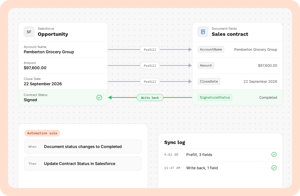
Your team spends hours copying information from Salesforce to documents, then back again. Every manual entry introduces risk: typos, outdated records, compliance gaps. altaFlow connects your CRM data directly to document workflows, automatically populating fields, routing approvals, and syncing status updates back to Salesforce. The result is accurate records, faster cycle times, and operations teams that focus on work that matters.

Why Choose altaFlow for Data Transfer?

No-Code Configuration Build data transfer workflows with drag-and-drop simplicity. Connect Salesforce fields to documents, forms, and approvals without writing code or waiting on developers.  
Bidirectional Sync Data flows both directions automatically. Pull CRM records into documents, then push signed document data back to Salesforce without manual intervention.  
Zero Rekeying Errors Eliminate typos and outdated information by removing manual data entry entirely. Validated fields ensure accuracy from first touch to final signature.  
Pre-Built Templates Start with proven templates for contracts, onboarding packets, and approval workflows. Customize them to match your exact Salesforce objects and field mappings.  
Enterprise Security SSO, role-based access, encryption, and complete audit trails protect sensitive data throughout every transfer. Built to support HIPAA, SOC 2, and regulated workflows.  
Native CRM Integration Purpose-built connectors for Salesforce, NetSuite, and Microsoft Dynamics ensure reliable sync without middleware complexity.  

How It Works

Step 1

Map Your Data 

Connect Salesforce objects and fields to your document templates. Define which records trigger workflows and where data should flow: contacts, accounts, opportunities, or custom objects.

Step 2

Configure Automation

Set rules for when data transfers occur. Launch workflows from Salesforce buttons, trigger syncs on record updates, or schedule batch transfers for recurring processes.

Step 3

Sync and Close the Loop 

Documents populate with live CRM data. Once signed or completed, status updates, timestamps, and captured fields write back to Salesforce automatically.

Who Benefits from Automated Data Transfer?

working-together-min
Sales Teams 

Generate quotes, proposals, and contracts pre-filled with account data. Close deals faster by eliminating the back-and-forth of manual document preparation and CRM updates.

 

business-meeting-min
RevOps 

Maintain reporting accuracy by ensuring CRM records stay synchronized with signed agreements. Reduce exception queues and manual reconciliation between systems.



operations-manager
Business Operations 

Stop chasing data across spreadsheets and disconnected tools. Centralize document workflows with automatic data population and real-time sync to your source of truth.

 

figuring-it-out-min
IT / Platform Owners

Reduce support tickets from operations teams requesting data fixes. Govern integrations with native connectors instead of managing brittle custom scripts.



interview-1
Human Resources 

Onboard new employees with forms that pull manager names, department codes, and start dates directly from your HRIS or Salesforce records. Reduce manual entry and improve new hire experience.



solution-help-min
Finance & Operations 

Generate invoices, purchase orders, and renewal documents with accurate line items pulled from CRM records. Sync payment status and approval timestamps back to close the loop.


Questions & Answers

Does altaFlow integrate with Salesforce natively?

Yes. altaFlow offers a native Salesforce integration that reads and writes data directly to your CRM. Launch workflows from any Salesforce object, pull field data into documents, and sync completed document status back to records automatically.

Do I need coding skills to set up data transfers?

No. altaFlow's drag-and-drop interface lets operations teams configure field mappings, triggers, and automation rules without writing code. IT involvement is optional, not required.

How does altaFlow protect sensitive data during transfer?

Data transfers occur over encrypted connections with full audit trails. Role-based access controls, SSO, and retention policies ensure compliance with HIPAA, SOC 2, and enterprise security requirements.

Can I sync data bidirectionally between documents and Salesforce?

Absolutely. altaFlow supports bidirectional sync: populate documents with CRM data on generation, then write captured form fields, signatures, and status updates back to Salesforce when workflows complete.

What CRM and ERP systems does altaFlow support? altaFlow provides native integrations for Salesforce, NetSuite, and Microsoft Dynamics. Additional connectors support SharePoint, Google Drive, and other business systems to unify your document workflows.

Connect Your Data in Minutes, Not Months

See how altaFlow automates CRM data syncs across your document workflows. Book a personalized demo with our team. 

8 1