Can altaFlow integrate with our existing CRM or ERP?
Yes. altaFlow offers native integrations with Salesforce, NetSuite, Microsoft Dynamics, and SharePoint. Approval workflows can launch directly from these systems, and status updates sync back automatically to keep records current.
How does altaFlow handle compliance and audit requirements?
Every approval action is captured with timestamps, user identity, and IP address. Complete audit trails are stored securely and exportable for compliance reviews, SOX audits, or regulatory inspections.
Can approval workflows route based on document values?
Absolutely. Configure routing rules based on any field value: dollar amounts, department codes, risk levels, or custom attributes. Documents automatically flow to the appropriate approver without manual intervention.
What happens if an approver misses their deadline?
altaFlow sends automated reminders before deadlines and can escalate to backup approvers when SLAs are breached. You define the escalation path and timing to ensure documents never stall indefinitely.
What is an approval workflow?
An approval workflow is an automated sequence that routes a document or request to designated reviewers in a defined order. Each reviewer is notified, reminded if action is pending, and their decision is logged. It replaces manual email chains with governed, trackable routing.
What types of documents can be routed through altaFlow?
altaFlow routes invoices, contracts, purchase orders, HR documents, vendor onboarding packets, proposals, and any other document type built with altaFlow's document generation or webform tools. If the document lives in your CRM or ERP, it can be routed.
Does altaFlow support conditional approval routing?
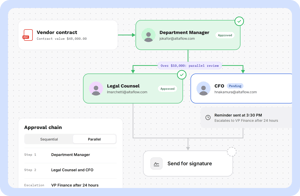
Yes. Routing rules can include conditions based on document value, field data, department, role level, or any custom attribute. For example, contracts above a defined threshold can automatically escalate to Legal and CFO, while contracts below that threshold route to a department manager only — without modifying the base workflow.
Does altaFlow integrate with Salesforce and NetSuite for approval workflows?
Yes. altaFlow has certified integrations with Salesforce, NetSuite, and Microsoft Dynamics. Approval workflows can trigger directly from CRM or ERP records, and approval status writes back to source records automatically.
Is altaFlow's approval workflow builder truly no-code?
Yes. Workflows are built using a drag-and-drop visual builder. Operations teams and business analysts configure routing rules, conditional logic, parallel approval paths, and escalation rules without writing code or involving IT. Changes to existing workflows take effect immediately on new submissions.
What is the difference between altaFlow and a basic eSignature tool for approvals?
eSignature tools collect signatures. altaFlow manages the entire pre-signature process — form or document creation, data collection, conditional routing, multi-step approvals, and compliance logging — and then routes directly to eSign as the final step. After signing, data writes back to your CRM or ERP automatically. The result is a complete, governed document lifecycle rather than a signature collection step.
Does altaFlow support parallel approvals?
Yes. altaFlow supports parallel approvals (multiple reviewers simultaneously), sequential approvals (step-by-step review chains), and hybrid workflows that combine both. You configure the structure once in the visual builder; the platform enforces it on every submission.
How does altaFlow handle missed approvals or stalled workflows?
altaFlow sends automated reminders on a configurable schedule before deadlines. If an approver misses their SLA, the workflow escalates automatically to a designated backup approver. Escalation paths and timing are set once in the workflow builder and apply to every submission.
How do you automate approval workflows without coding?
altaFlow provides a no-code workflow builder where you can create multi-step approval processes using drag-and-drop. Define your approval stages, assign approvers by role or department, set conditional routing rules, and activate the workflow. No developer tickets, no custom code, no IT dependency. Changes can be made in minutes by admins or ops teams.
What happens when an approval is stalled or overdue?
altaFlow automatically escalates stalled approvals based on rules you define. Set time-based triggers (e.g., escalate after 24 hours with no response) and choose where the approval routes next: a backup approver, a manager, or an escalation queue. Every escalation is logged for compliance and visibility.
Can approval routing change based on contract value or risk level?
Yes. altaFlow supports conditional routing where the approval path adjusts automatically based on Salesforce fields like contract value, deal size, risk tier, or department. You define the thresholds and rules once, and every approval request is routed to the correct chain without manual intervention.
Does altaFlow support multi-step approval workflows?
Yes. You can build approval workflows with as many steps as needed, including sequential approvals (one after another), parallel approvals (multiple approvers at the same time), and conditional steps that only trigger when specific criteria are met. Each step can have its own routing rules, escalation timers, and notification settings.
How does altaFlow handle approval delegation when someone is out of office?
altaFlow lets approvers set standing or one-time delegation rules. When an approver is unavailable, their designated backup receives the approval request automatically. Delegation history is tracked in the audit trail so there is always a clear record of who approved what and when.tion i