
Skip to content

Document work. Powered by your Google Sheets.

altaFlow connects your Google Sheets to your document workflows in both directions. Pull data into a contract or offer letter before it's sent. Push what recipients filled in — dates, names, values — to a tracking sheet. Set it up once, and it runs on every submission.
Google Sheets

Why altaFlow for Google Sheets

Native by design Connects directly to Google Sheets, using the access and permissions you already have.  
Two-way in one workflow Pre-fill from a sheet and export back to a sheet happen inside the same workflow.  
Audit-ready by default Every run, every write, and every recipient action is logged in the Audit trail.  
No-code, end to end Your team can implement altaFlow without relying on IT.  

How Does It Work?

Step 1

Connect your Google Workspace account to altaFlow in just a few clicks

Step 2

Select and configure the no-code Bot that matches your workflow needs

Step 3

Set your if-this-then-that conditions to control when and how the Bot runs

Step 4
Launch your workflow and let altaFlow handle the rest automatically

Google Sheets bots for every step of your document workflow

From pulling spreadsheet data into documents to sending them on a schedule, each bot automates a specific part of the process. Use one, combine several, or run them all together.
Bot
Description
Pre-fill documents from your spreadsheet data
When a recipient opens a document, it's already populated. Their name, company, contract terms, product details — pulled from the right row in your Google Sheet.
Write the completed document data back to Google Sheets
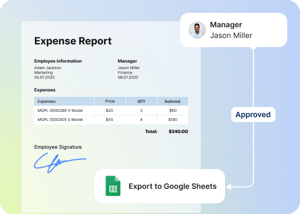
When a document is completed, the data goes back to Google Sheets. You decide which fields map to which columns. No one has to copy anything.
Send documents on a recurring schedule from a sheet
Connect a sheet, set a schedule, and automatically send pre-filled documents to recipients. Daily, weekly, or at whatever interval you need. Perfect for any process that repeats on a fixed schedule.
Send documents when a sheet is updated
When a row is added or changed in a sheet, altaFlow automatically sends a pre-filled document. No one has to notice the update and act on it. The sheet change is the trigger.
Keep dropdown options in sync with your sheet
Maintain your option lists in a Google Sheet rather than in the document template. When the sheet changes, the form updates accordingly.
Export with the context your records actually need
Add status labels, team codes, or process flags to the export — items that aren't in the document but are important for your records.

Works for every team that works with Google Sheets

interview-1

Sales and RevOps

Quote new opportunities the moment they hit the pipeline. Send the contract the second a deal closes. See signed terms in the revenue tracker the same day the deal lands.

solution-help-min

HR and People Ops

Onboarding packets are automatically sent when a new hire is added to the sheet. Once signed, their address, tax details, and emergency contacts write back to the sheet automatically. All the day one paperwork is handled before the employee walks in.

working-together-min

Finance and Billing

Monthly invoices are generated from the billing sheet on schedule, per client, per region, or per account owner. Approved totals are exported to reconciliation as each document completes.

conversation

Operations

Inspection forms open pre-filled with every asset ID, site, and owner. Completed checklists update the register in place, keeping the record up to date without anyone having to maintain it.

altaFlow-focused-team

Legal

Approved procurement rows become signed agreements without a handoff. Counterparty data, effective dates, and executed terms flow back into the legal matters sheet for every closed document.

altaFlow-businesswoman-presenting-meeting

Customer Success

QBR forms arrive pre-filled with the account context that customers recognize. Responses flow back as new rows in a CS tracking sheet, tagged, dated, and ready for the next review.

Questions & Answers

What can I actually do with Google Sheets in altaFlow?

You can pull data from a Sheet to pre-fill documents and dropdowns, trigger documents from Sheet updates or on a schedule, and export completed document data back into a Sheet with row-level matching.

Which Google Sheets can I connect?

Any spreadsheet in a Google Drive account you authorize. During setup, you connect a Google account with a standard OAuth flow, then browse your Drive to select the spreadsheet you want.

Can I use a spreadsheet that's shared with me, even if I don’t own it?

Yes, you can connect any spreadsheet in your Google Drive that you have at least edit access to, whether you own it or it's shared with you.

Can I pre-fill from one sheet and export to another?

Yes. Pre-fill bots and export bots are configured independently. Each one points to its own spreadsheet. You can read from one and write to another in the same workflow.

Can I export to a spreadsheet that doesn't exist yet? Yes. The export bot can create a new spreadsheet during the workflow run. You can name it with a fixed name, use a document field value, or use a timestamp so each run creates a uniquely named sheet.
Do I need IT to set this up? No. You connect your Google account, select spreadsheets, and map fields using dropdowns. No scripts or API credentials required.

Ready to automate your Google Sheets workflows?

Get started with altaFlow today — no code required.

44