


Key takeaways
- The key difference: Low-code requires developer involvement. No-code routes workflow ownership to operations.
- Low-code's real costs (implementation, IT maintenance, change requests) are backend-loaded and rarely visible at purchase.
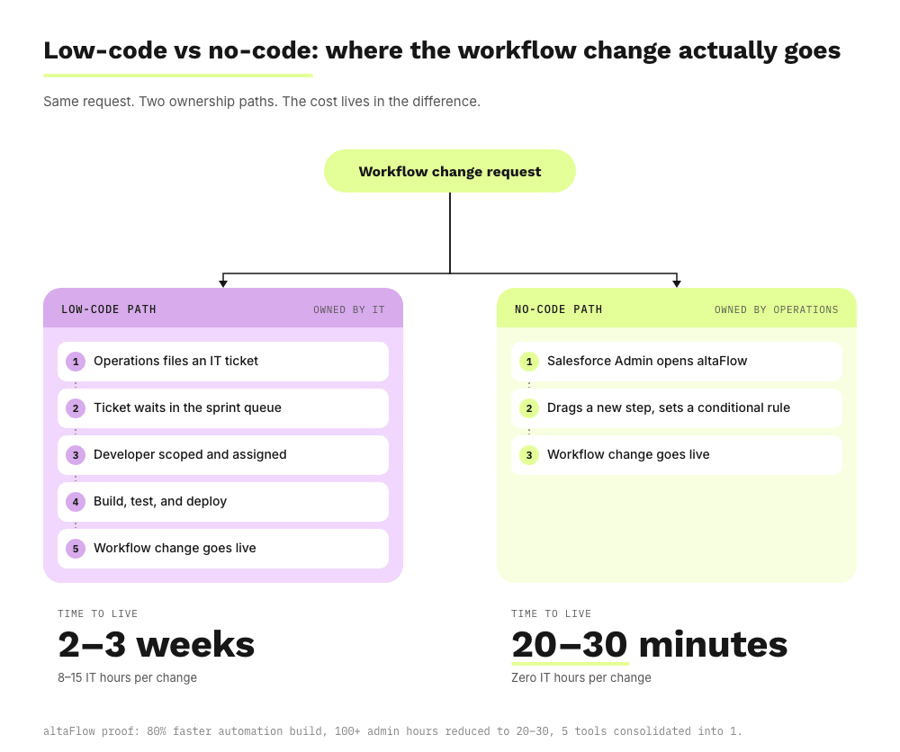
- For a 500-employee Salesforce shop, no-code cuts the average workflow change from 2–3 weeks down to 20–30 minutes.
- Low-code is best for custom API orchestration. No-code is best for document workflows, approval routing, and CRM data sync.
- altaFlow customers see 30% lower cost than DocuSign, Conga, and PandaDoc, 80% faster automation build time, and 100+ admin hours reduced to 20–30.
When choosing between a low-code or no-code platform, the decision often feels straightforward at the time of purchase. Six months later, however, a different reality sets in.
Sales asks Operations to add a new approver to the contract chain. Operations files a ticket with IT. IT comes back three weeks later with a clarifying question. By the time the change is live, the original requester has stopped asking.
This is the moment you discover the true difference between a low-code platform and a no-code one. Vendor marketing rarely makes this distinction clearly, and most platforms market themselves as both depending on the audience. The result is that mid-market teams end up paying for a platform their operations team cannot run.
In this guide, we'll take a structural look at what each model actually costs, to help you evaluate which platform is the best fit before you make a purchase decision.
Definitions: What each actually means in practice
What exactly is a low-code or no-code platform? The taxonomy has been muddied by vendor marketing. The clean line is not drag-and-drop versus typing code — it is who owns the workflow.
What is low-code automation?
Low-code is a development approach that reduces, but does not eliminate, the need for hand-written code. A developer or technically trained admin still configures integrations, conditional logic, and platform maintenance. Drag-and-drop layers exist, but any change beyond the visual surface requires technical intervention. Per Forrester, the low-code application platform market is projected to approach $50 billion by 2028, which reflects how broadly the category has expanded.
What is no-code automation?
No-code is a platform model that routes all configuration through visual interfaces. Operations users build, change, and govern workflows without a developer. Salesforce defines this practice as citizen development, a recognized and governed approach where business users own the automations they depend on, with the platform enforcing role-based access, approval logic, and audit trails.
What is the practical difference?
At the end of the day, the difference between platforms comes down to ownership. Low-code routes workflow ownership to IT. No-code routes it to operations. The speed of change, the cost of maintenance, the bottleneck risk, and everything else follows from that single difference.
The hidden cost of low-code in mid-market operations
Of course, low-code platforms work in certain scenarios. But their real costs are backend-loaded and rarely visible at the time of purchase. Three categories matter for mid-market operations.
Implementation cost. Enterprise low-code platforms typically take 3–6 months to implement and frequently require external consultants. BCG research on enterprise software projects found a significant share run late, over budget, or fail to deliver promised value. The implementation line item is rarely just the platform fee — it includes consulting hours, internal IT bandwidth, and the cost of delayed time-to-value.
Maintenance cost. Every workflow change that requires developer involvement has an opportunity cost. A blended developer rate of $150 per hour is conservative for mid-market organizations. If your IT team handles 16 workflow changes per year, each consuming 8–15 hours, that's roughly $25,000–$35,000 per year in maintenance alone — not including the security patches, integrations, and product work that get pushed back in the queue.
Scalability cost. Low-code workflows accumulate technical debt. The more conditional logic you stack on top of the visual layer, the more fragile the workflow becomes when business rules change. Per Gartner research, organizations are now running multiple forms of process-agnostic hyperautomation tools, each carrying its own maintenance burden. The complexity is cumulative.
Worked example: 500-employee mid-market organization, 10 active workflows, 16 workflow changes per year, $150 blended developer rate. Figures are directional, drawn from a TCO methodology consistent with CIO.com and Kissflow's published cost frameworks.
The point is not that low-code is bad. The point is that the costs you don't see at purchase are often larger than the ones you do.
When low-code makes sense, and when it doesn't
There are scenarios where low-code is the right answer, and a diligent evaluation can help you make that decision.
Low-code is appropriate when:
- The use case requires custom integrations to systems with no pre-built connectors
- The organization has dedicated IT capacity to maintain automation infrastructure
- The workflow is developer-facing, like CI/CD pipelines or API orchestration
No-code is appropriate when:
- The operations team needs to build and change workflows without a development queue
- The use case involves document lifecycle, approval routing, or CRM data sync
- The organization is mid-market with limited IT bandwidth and a need for governed self-service
Per Gartner's research on low-code application platforms, differentiation in the LCAP market is challenging, and many platforms lack composable architectures. The decision is not low-code versus no-code in the abstract — it is which model fits the specific use case in front of you.
If your use case is custom application development or API orchestration, low-code is probably correct. If your use case is document workflows and approval routing inside Salesforce, it is not.
What a no-code automation stack looks like for a 500-person Salesforce shop
Picture a 500-person company. Salesforce is the primary CRM. The IT team has 3 people. Two Salesforce Admins handle CRM-related work. There are 8 active workflows with pending change requests.
In the current state, requests stack up. Sales wants a new approval threshold added. HR wants the offer letter workflow updated for a new geography. Finance wants a discount tier added to the contract template. Each request becomes a ticket. Each ticket waits for sprint capacity. The average resolution time is 2–3 weeks.
In a no-code state, the same Salesforce Admin who manages CRM records also configures the workflow. Routing logic, conditional escalation, and approval chains are built visually. Changes that take 2–3 weeks under the current model instead take 20–30 minutes, The IT team is removed from the routine workflow maintenance loop entirely.
This is what altaFlow is built for. altaFlow is a no-code platform for document-driven operations in Salesforce, combining document generation, PDF editing, workflow automation, contract management, and eSignature in one governed platform. Per Salesforce's own white paper on governing low-code development, citizen development is a recognized and governable practice when the platform is built for it. Customers running document workflows on altaFlow see:
- 100+ admin hours reduced to 20–30
- Automation build time cut by 80%
- 5 separate document tools consolidated into 1 platform
For the foundational view of how this fits into a broader automation strategy, see our guide to business process automation, and for the product detail, the workflow automation software use case page.
Frequently Asked Questions
What is the difference between low-code and no-code?
Low-code reduces but does not eliminate the need for hand-written code. It still requires developers or technical admins to configure integrations, conditional logic, and platform maintenance. No-code routes all configuration through visual interfaces, so operations users can build and change workflows without a developer. The operational difference is who owns the workflow: low-code routes ownership to IT, no-code routes it to operations.
What is low-code business process automation?
Low-code business process automation is the use of low-code platforms to build and run business workflows. It reduces the volume of hand-written code required, but technical users are still needed to configure complex logic, integrations, and ongoing platform maintenance. Most enterprise low-code BPA platforms take 3–6 months to implement and require continuing IT involvement to maintain.
Can non-technical users build workflows with no-code tools?
Yes. The operational definition of no-code is that a non-technical user — typically a Salesforce Admin, Operations Manager, or RevOps lead — can build, change, and govern workflows without writing code or filing an IT ticket. Salesforce categorizes this practice as citizen development. The platform enforces governance through role-based access, approval rules, and audit trails, so self-service does not become shadow IT.
What does no-code automation cost compared to low-code?
The licensing line on a low-code platform is rarely the dominant cost. Implementation, IT maintenance, and workflow change requests typically add several multiples of the licensing fee over a 3-year window. No-code platforms shift those costs out of the equation by removing IT from routine workflow maintenance. Customers using altaFlow see 30% lower total cost than DocuSign, Conga, and PandaDoc, and 2x ROI on average.
Is low-code or no-code better for Salesforce workflow automation?
For document-driven Salesforce workflows — including contract approvals, document generation, and CRM data sync — no-code is the better fit. The operations and RevOps teams who own these workflows don't have development resources, and the workflows change too frequently to route through an IT sprint queue. For custom application development or complex API orchestration, low-code is more appropriate.
In summary: choose the model that matches who actually owns the workflow
The low-code versus no-code question is not a technical preference — it is an organizational structure decision. Pick the model that puts workflow ownership in the hands of the team that runs the process every day, and the platform pays for itself in change velocity alone.