


Key takeaways
- Manual approval workflows fail at six predictable points: routing logic, escalation paths, document visibility, CRM context, version control, and audit trails. Any one of them stalls a deal.
- Top-performing organizations close contracts in 10 days. The industry average is 40. On a $50M pipeline, closing that gap is the difference between $45.7M and $48.5M in realized revenue.
- Contract value erodes at 8.6% on average when approval processes are broken. Best performers hold that to 3%. The gap is calculable and it compounds every quarter.
- IT dependency is the root cause most organizations underestimate. When routing logic lives in a ticket queue, every workflow change waits for a sprint that may never come.
- altaFlow customers see contract cycle times cut by 40%, automation build time reduced by 80%, and admin hours dropped from 100+ to 20-30, at 30% lower cost than DocuSign, Conga, and PandaDoc.
The contract request was routine.
A sales rep generated the contract from Salesforce at 9:15am. By 9:30, it was sitting in Legal's inbox for a quick pass on a non-standard clause. Next step would be to get Finance's approval on a 12% discount, and then the contract would be ready for customer signature.
At 2:15pm that day, the sales rep followed up with legal via Slack. No response.
The next morning, Finance asked if Legal had signed off yet. Legal hadn't even opened the email.
By day three, one version of the document existed in email and another version existed in the shared drive, yet neither was marked as final.
On day six, the approver in Legal went on PTO. No other approver was assigned, and there was no path forward. The contract was just stuck.
On day ten, the customer asked if the deal was moving forward or not. The truth was, it hadn't been rejected or negotiated. It hadn't even been reviewed.
Nothing broke, except that the whole system was flawed from the onset. There was no routing accountability. Approvals depended on people checking their inboxes. Ownership was implied, not enforced. And every hour that went by without a signed contract was another hour of wasted dollars.
If manual document lifecycles like this one are slowing your team down, it's time for a change.
The anatomy of a broken approval workflow
According to World Commerce & Contracting (WorldCC), 76% of professionals experience friction and inefficiencies in the contracting process.
That's largely driven by failures in the approval process.
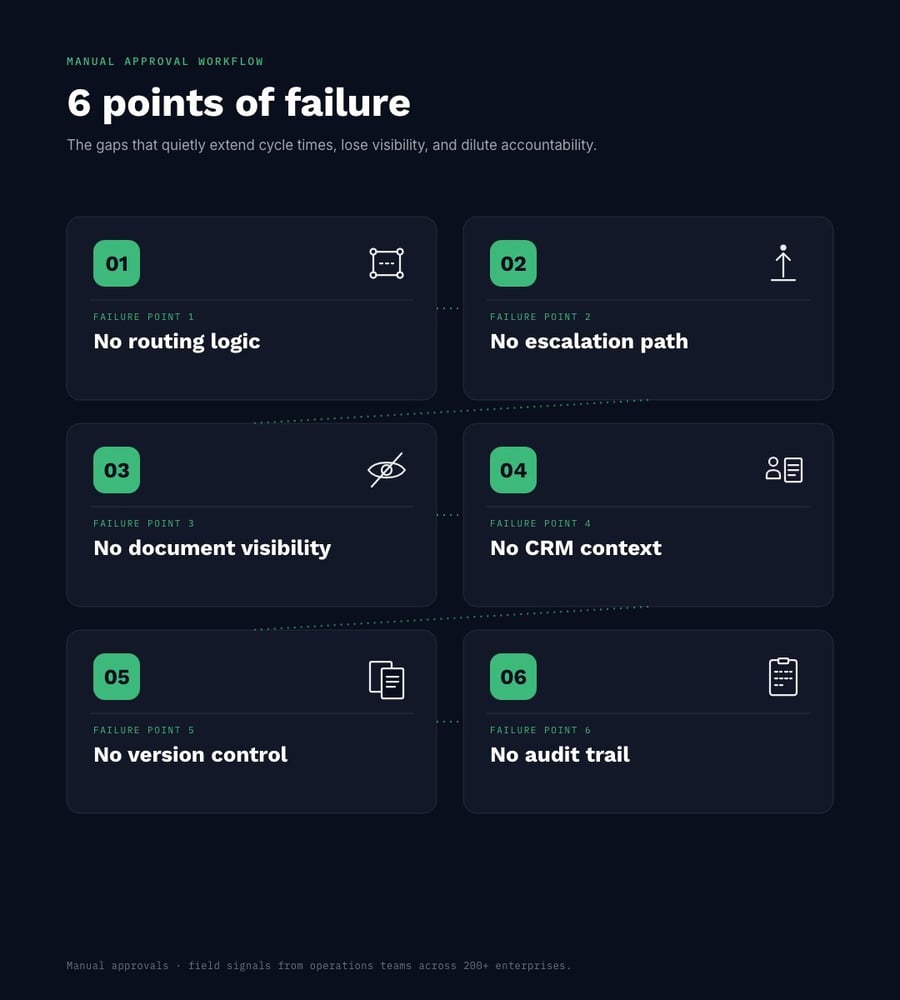
A typical manual approval workflow has six points of predictable failure. And approval failures happen because contract data is scattered across multiple disconnected systems.
The six failure points are:
-
Routing logic doesn't live where it should
Without an automated system in place, routing happens in someone's head or on a spreadsheet. There's no way to automatically trigger a logical next step and keep the process flowing without manual intervention. Approvals often stall because they get stuck in a cycle until somebody remembers to move them forward.
-
If an approver is unavailable, there's no escalation path
When your approval process relies on manual intervention, cycle times rely on your document approver being available. Per Ironclad, the average time to execute a contract is 35 days. If your document approver gets sick, has an emergency, or is out of office for any reason, a lack of automated escalation extends the contract execution time further, delays the projects, and delays dollars earned, too.
-
No visibility into where the document is at any given moment
Manual approval processes mean little visibility into a document as it moves. Documents that get routed manually sit unread, in a Slack message, or are saved on personal drives. It's nearly impossible to know a document's current status or who has it at any given time.
-
No CRM context
Because approvers are receiving documents manually, they often lack any relevant CRM context. Unless the sender copies CRM details into a message to the approver, or the approver searches for information themselves, those details may be missed and may delay the project from getting started.
-
Lack of version control
Documents that get routed manually and change hands several times often get copied or saved as multiple versions. Without automation and a single source of truth, it's challenging to keep track of document versions and know which is the latest copy.
-
No audit trail
A manual approval process workflow might send a document through email, Slack, a shared drive, and back into a CRM. If you're audited, how can you quickly and accurately show a document's path? With systematic routing and automatic triggers, a document lives in one single place and that document's activity is easily tracked and saved.
Approval cycle time benchmarks by document type
Document-driven organizations with speedier and more accurate cycle times have an operational advantage over slower organizations. According to WorldCC, organizations see an average contract value erosion of 8.6%, with the best performers operating around 3%. What does that mean for revenue?
Let's say two organizations did $50 million in contracted deals last year. Organization A leaked at a rate of 8.6% while Organization B leaked at a rate of 3%.
| Document Type | Industry Average | Top Performer | Primary Points of Failure |
|---|---|---|---|
| Contracts/MSAs | ~40 days | ~10 days |
|
| Sales Proposals | ~21 days According to Ironclad |
~5.25 days |
|
| Employee Onboarding Documents | ~1-2 weeks According to Bind |
~1-3 days According to Bind |
|
| Purchase Orders | ~1-3 days According to Umbrex |
Same day |
|
The difference between those who meet industry averages versus those who are consistently top performers is millions of dollars in captured (versus lost) revenue. The goal is more nuanced than just speeding up cycle times. Organizations need to modernize and optimize the document approval workflow process so that routine points of failure are eliminated, contract value erosion slows down, and more revenue is won on each closed deal.
The 4 root causes of approval bottlenecks
We know where approval workflows break and what the ramifications are, but what is really causing those points of failure to happen?
Document approval workflow bottlenecks can be traced to four structural causes, which compound over time:
-
IT dependency. Without a systematic approach, routing logic often lives in the hands of your IT team. If any updates to your manual routing process are needed, you'll have to submit a ticket to IT and they'll have to fit that task into an upcoming sprint. Not only is this frustrating and outdated, but it means that workflows cannot evolve at the speed of the business. They can only change as fast as your IT team can get to those changes.
According to Salesforce, 95% of IT leaders say their organizations are prioritizing workflow automation. If that's so, why are you still submitting tickets?
-
No conditional logic. A lack of automation and a modernized document lifecycle tool means no built-in triggers to keep your documents moving forward. Workflows rely on human, manual intervention, which causes detrimental gaps.
Dynamic, rule-based routing, with logic like "If approver A is out, escalate to approver B", keeps the approval cycle intact and constantly flowing, whether your approver is in office or not.
-
A lack of visibility. Without governance over documents, there cannot exist one single view into where every pending approval sits. Managers constantly need to ask for status updates, which document owners spend too much time tracking down.
With modern, automated tools, status updates sit in a centralized dashboard, instead of someone's head.
-
Manual re-entry of CRM data. When documents are finally approved, it is up to document owners to ensure that data is reflected across all systems in an org (which could be 24 different, disconnected systems!).
There are no automatically updated Salesforce records. Someone has to manually update the CRM after the fact, leaving the record prone to human error or insufficient information.
These issues cause frustration across the organization, and are damaging, too. When organizational changes outpace internal systems, approvals stall, time is wasted, data is inconsistent, and errors ripple into reporting, forecasting, and other workflows.
A governed, no-code approval layer removes IT dependency and allows document-driven teams to work more efficiently.
What a governed approval workflow looks like in practice
Moving away from an ad-hoc approval process to a governed infrastructure is like rebuilding an old road into a controlled highway system. In the old version, you've got potholes, missing signs, and no clear lanes. Cars slow down, swerve, or stop altogether. Some even take side streets (email, Slack) just to keep moving. Like those cars, your documents are delayed, rerouted, or lost in the process.
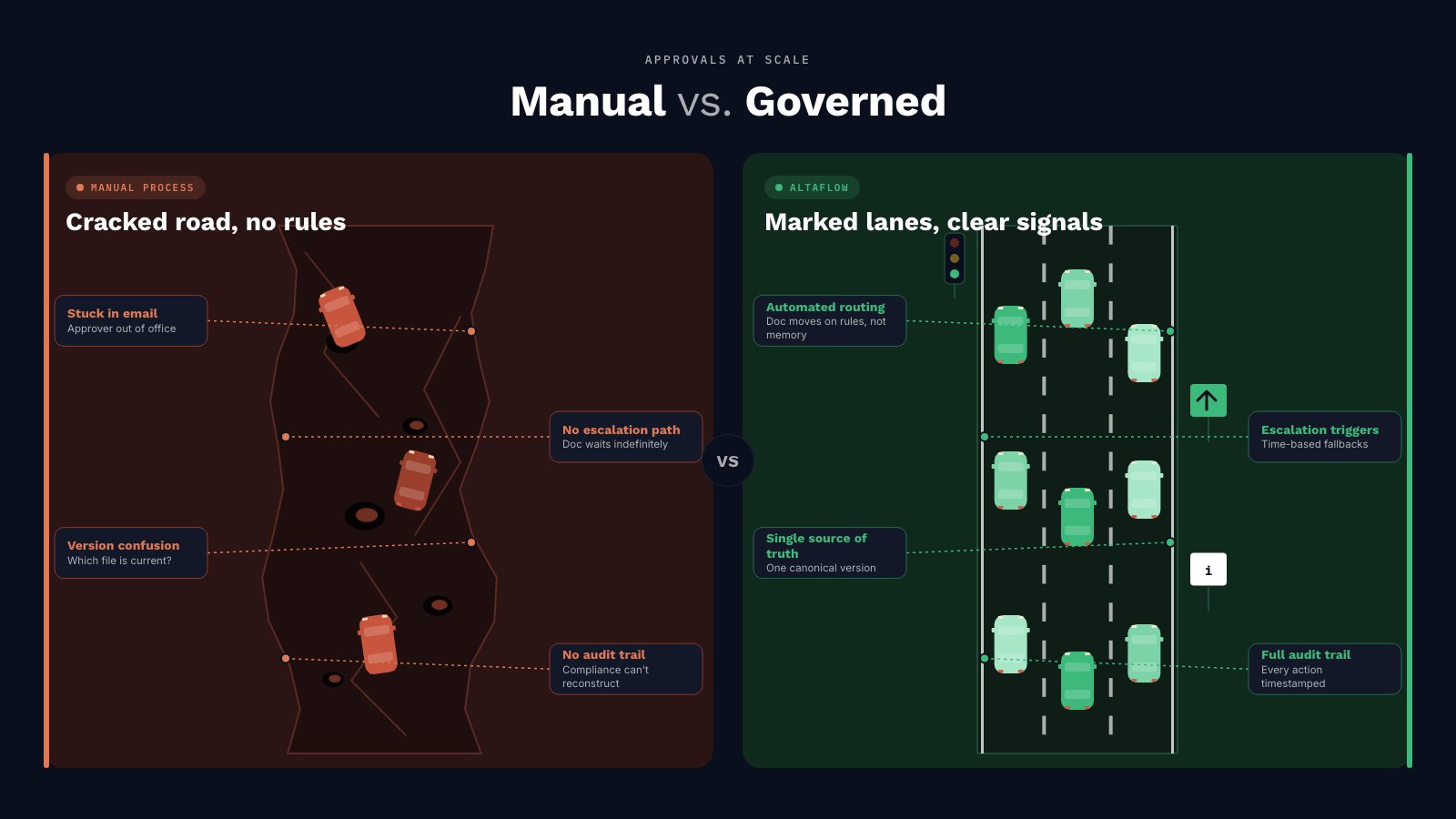
A governed system changes the conditions. The road is smooth and there are lanes (routing logic), traffic signals (approvals), detours (escalation paths), and visibility (dashboards). Your documents - like the cars on this new highway - keep moving in the right direction.
Instead of having to compensate for a broken system, the system actually does the work.
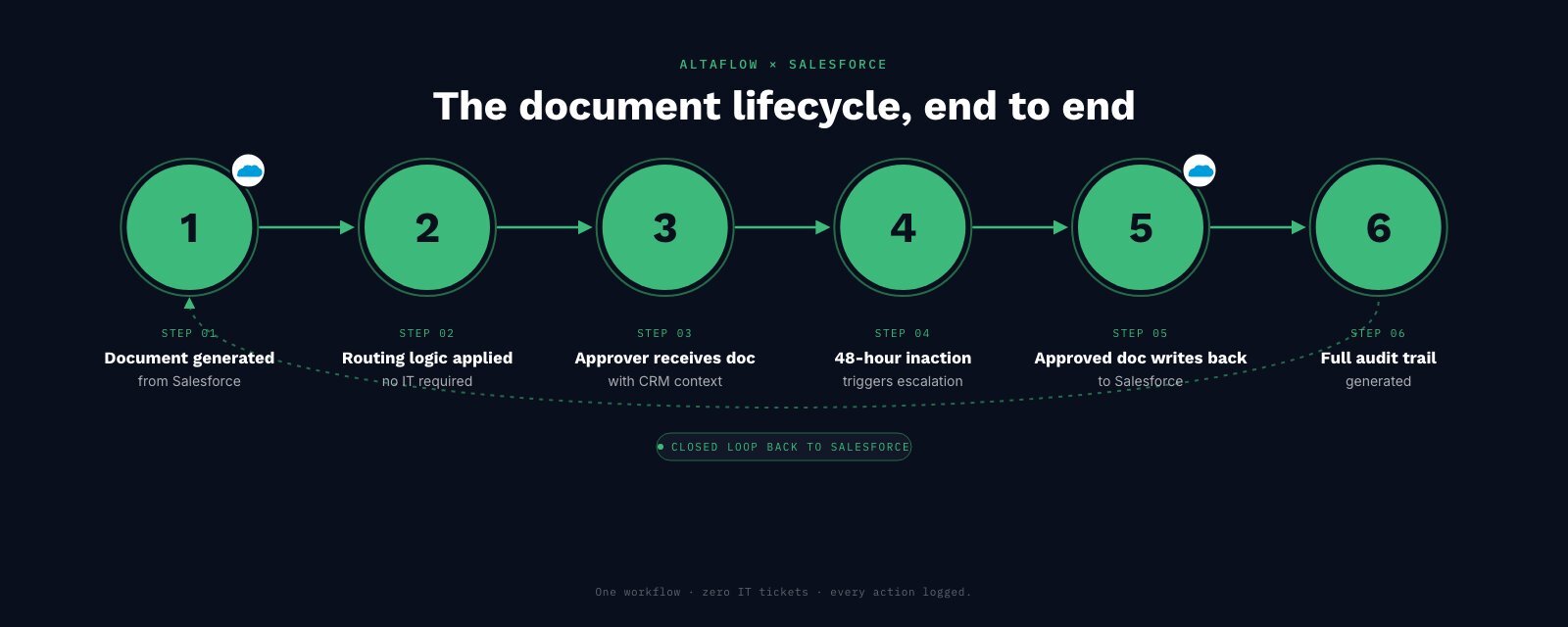
altaFlow is a no-code, governed document automation platform that keeps everything in one place. Rather than the six points of failure that occur in a manual approval workflow process, document lifecycles with altaFlow look like:
- A document is auto-generated from a Salesforce record
- Routing logic is pre-configured and updates without IT dependency
- The approver receives the document with full CRM context in the approval notification
- If 48 hours go by without action, an escalation path is automatically triggered
- The approved document automatically writes back to Salesforce on completion
- A full audit trail is generated
When document approval workflows are automated with altaFlow:
- Contract cycle times are reduced by 40%
- No IT dependency means 80% faster automation build time
- ROI is doubled
- Multiple, disconnected tools are consolidated into one single platform
- Admin hours are reduced by 70%+
What each day of delay costs
Sometimes, resistance to change comes from feeling like everything is working fine. Instead of looking at what does work with your current workflows, think about the opportunities you are losing out on.
There is a tangible financial risk associated with using multiple, disconnected tools, relying on manual intervention, and depending on IT to update processes.
If you're wondering whether it's worth investing in a document automation platform, we can help. We'll show you what the cost-of-delay looks like for a mid-market organization and give you guidance for making your own calculations.
Apply this formula to your own pipeline to understand your cost of inaction:
Delayed Revenue Exposure = (Average Contract Value) x (Number of Contracts in Approval) x (Days of Delay)
This will show you how much revenue you have sitting in limbo at any given moment because approvals aren't moving forward.
For example, let's say a mid-market organization has an average contract value of $75,000 and they currently have 20 contracts out for approval, with an average delay of 11 days. Their delayed revenue exposure is:
75,000 x 20 x 11 = $16,500,000
This doesn't necessarily mean the organization has lost $16.5M, but that revenue is not recognized and is at risk the longer it sits. It represents the amount of potential revenue that's stuck in your pipeline.
When we apply WorldCC's statistic on contract value erosion which is 8.6% on average, we get a permanent value loss of $129,000 ($1,500,000 in approval x 8.6% = $129,000).
This is a loss that comes from deals that never close because they took too long to get approved.
The hard truth is that if you hesitate to modernize your modern approval workflows, you're not just dealing with inefficient sales velocity. You're dealing with calculable dollar amounts lost, which impacts the health of your organization.
FAQs
-
What is contract approval automation?
Contract approval automation is the use of software to route, review, and approve contracts based on predefined rules. It replaces manual processes that use email chains and spreadsheets with structured workflows that automatically assign approvers, track status, and enforce approval logic.
-
How long should a contract approval process take?
It depends on complexity, document type, and industry, but most standard contracts should move through approval in 24-72 hours. Simple, low-risk agreements can often be approved within a few hours when automation and clear routing rules are in place.
-
What causes approval workflow bottlenecks?
Common causes include unclear ownership, missing approvers, manual routing, lack of escalation rules, overloaded stakeholders, manual data entry, too much dependency on IT teams, and poor visibility into where a contract is stuck in the process.
-
How does approval routing work in Salesforce?
In Salesforce, approval routing uses predefined approval processes to automatically send records (like contracts) to the right stakeholders based on criteria such as deal size, region, or product type. Approvers receive tasks in sequence or parallel, and the system tracks each step until final approval or rejection.
-
What is the cost of a slow contract approval process?
A slow approval process delays revenue recognition, increases administrative overhead, and can risk deal loss. Even small delays compound: multiple contracts stuck in approval can represent significant deferred revenue exposure and reduced sales velocity over time.
In summary: Stop approval bottlenecks and unlock revenue with automated, no-code workflows
If you've been a victim of delayed approval cycles, too much IT dependency, tedious manual work, and document approval workflows that just don't flow, you're not alone. Almost 90% of business users have difficulty with contracts.
The good news is that technology has improved and no-code, governed workflows are proven to speed up contract cycles, recover more ROI, and reduce administrative burden.
Ready to learn more? See how altaFlow automates multi-step approvals without IT dependency.