


Key Takeaways
- Contract lifecycle management (CLM) covers seven stages: creation, review, negotiation, approval, execution, obligation management, and renewal. Most organizations govern the first few stages reasonably well. The gaps in execution, obligation management, and renewal are where the real cost accumulates.
- WorldCC research shows organizations lose nearly 9% of their annual value to poor contract management. For a $300M business, that is $27M per year.
- The most expensive CLM failure for Salesforce teams is not a broken approval workflow or a missed signature. It is contract data that never syncs back to Salesforce after execution, leaving CRM records inaccurate and obligation tracking nonexistent.
- The average contract takes 35 days to execute, according to Ironclad. An unmanaged CLM process extends that further, with approval bottlenecks as the leading cause of delay.
- When evaluating CLM vendors, the key question is not whether they integrate with Salesforce. It is whether they close the full Salesforce to Document to Salesforce loop natively, without manual re-entry or a separate integration build.
Three months ago, your sales team closed a deal they had been working for some time. It was a big one and, rightfully, everyone celebrated the win.
Today, a compliance audit of this deal is requested. As you go about gathering docs for that audit, you realize you can’t find the contract’s renewal date, Salesforce is showing outdated information, and you can’t track down the approval chain.
How did this happen? Where did the process break?
As an operations leader, inefficient contract management can be one of the most frustrating parts of the job. Using too many tools to manage different parts of the contract lifecycle results in time and money wasted, incomplete or inaccurate Salesforce records, and an unreliable paper trail.
What you need is a contract lifecycle management (CLM) framework that closes the loop back to Salesforce automatically. When everything happens in one place, audits are no longer painful and Salesforce records become a source of truth.
In this guide, we’ll show you an operational CLM model that works for midmarket organizations running Salesforce and will save you time, money, and maybe even a headache or two.
What is contract lifecycle management (CLM)?
Contract lifecycle management is the end-to-end process of creating, executing, and managing contracts from initiation through renewal. For operations leaders, it is the system that governs how agreements move through your organization, who approves what, when documents get signed, and whether that data makes it back into your CRM.
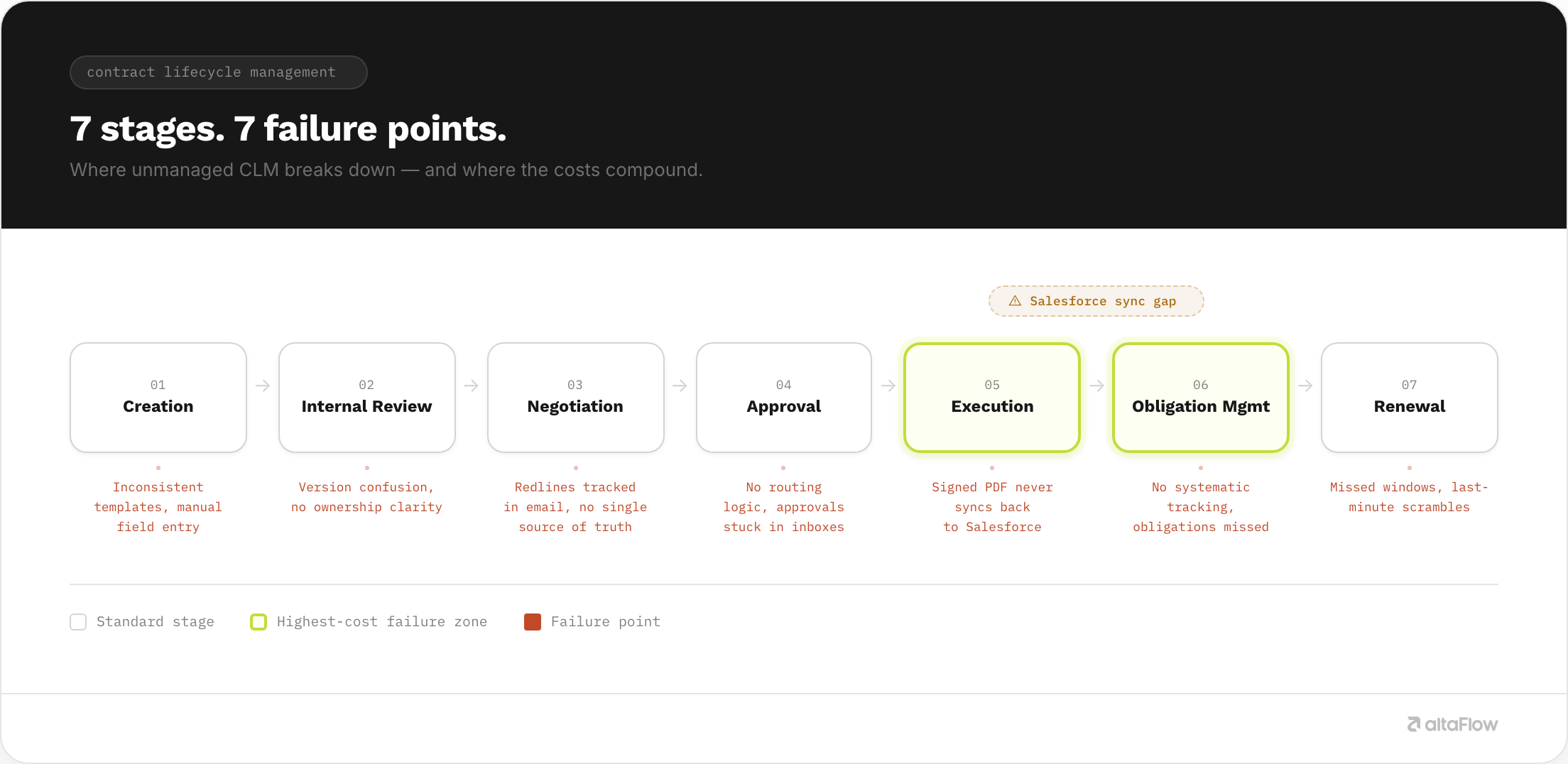
The full lifecycle of a contract doesn’t end when all parties have signed. That’s simply one step of a fully governed process. That fully governed process - otherwise known as CLM - is defined by seven stages:
- Contract creation
- Review
- Negotiation
- Approval
- Execution or signature collection
- Obligation management
- Renewal
Operationally, every stage is important. Many organizations have well-oiled workflows for contract creation and signature collection, but what happens before and after those stages matters, too. Critically, how well or not each stage connects to the next one can make or break the CLM process.
In fact, WorldCC reports that organizations lose almost 9% of their value annually due to poor contract management. A midmarket organization bringing in $300M in annual revenue risks losing $27 million in one year due to inefficient CLM processes. That’s simply unacceptable. However, implementing technology to formalize the CLM process can be a simple solution.
The 7-Stage CLM Lifecycle
Let’s zoom in on each stage of the CLM process to help you evaluate against your organization’s current processes and understand where failures are most likely to occur.
- Contract Creation: This is where the contract’s lifecycle begins and it involves drafting the document from a template or from scratch. Inefficiencies at this stage are often due to a lack of a standardized process (such as using templates for repeatable work) or needing to rework the contract multiple times.
- Review: At this stage, a contract draft gets sent to internal stakeholders, such as legal or compliance teams, for review. This is where cycles can first stall, especially if teams are relying on email or tools like Slack to route documents. Contracts end up sitting in inboxes or unread messages for too long.
- Negotiation: After a contract is reviewed internally, it goes back to the original owner for changes. This negotiation stage involves redline loops with counterparties and iterating the contract until all parties are satisfied. Here, inefficiencies occur if there is no version control system in place. Solid version control helps all parties understand which document is the most up-to-date.
- Approval: Once a contract has been updated to reflect all parties’ needs, the internal approval routing process begins. According to Ironclad’s 2026 Contracting Benchmark Report, the average time to execute a contract is 35 days. Bottlenecks are common here and they can be costly. Most delays and bottlenecks happen because of manual handoffs and outdated systems.
- Execution: At the execution stage, contracts have been approved and signatures are collected from all parties. Many organizations use eSignature tools at this step, which can function well but often leave out the rest of the CLM process. Here is where stakeholders start to question how they’re syncing data back to Salesforce. If this is happening manually, the risk of human error is high and inefficiencies are inevitable.
- Obligation Management: This is an important, but sometimes overlooked step. Things don’t just stop when signatures are collected. Obligation management involves tracking what each party owes post-signature. Unfortunately, this is often happening inside spreadsheets or email threads, fully disconnected from Salesforce. Here, value leakage and revenue erosion occur, and the Salesforce → Document → Salesforce loop fails. Repeated failures at this step signal that a unified document automation solution may be needed.
- Renewal: Getting this step of the CLM process right mitigates downstream revenue risk for many organizations. The renewal stage involves identifying and acting on renewal windows before they lapse. With a fully governed CLM process, this step can be automated and optimized.
What Breaks at Each Stage and What it Costs
Use the table below to understand what breaks at each stage of the CLM process, who it impacts, and what it costs. Understanding where your organization is most at risk can help you make changes that will drive the most impactful results.
We will model our examples based on these assumptions:
- 2 errors per every 10 contracts created (According to the Association of Corporate Counsel, manual contract processes produce error rates between 15-25%)
- Team members spend 2 hours of rework per error made, at a cost of $122 per hour
- Team members spend 10 hours per month tracking down eSignatures
| Stage | Common Failure Mode | Impact Type | Downstream Cost Signal |
|---|---|---|---|
| Creation | Manual data entry from CRM into templates | Operational | $244 lost for every error made; an organization of 500 that makes 100 errors per month loses $244,000 per month just from fixing errors |
| Review | No visibility into review status; data scattered across an average of 24 different systems Source: WorldCC |
Operational | Longer contract cycle times, stakeholder escalations, revenue erosion, and erosion of trust among team members |
| Negotiation | Untracked redline versions; lack of formal version control | Operational / Compliance Risk | Compliance exposure, dispute risk, lack of accountability (70-80% of team members lack clarity on who is responsible for contracts) Source: WorldCC |
| Approval | Ad hoc routing via email or Slack | Operational / Financial | Average 35-day contract approval time gets delayed further, parties get frustrated; deals are lost Source: Ironclad |
| Execution | eSign captured, but not written back to CRM | Operational / Financial | CRM data decay, manual re-entry, high risk of human error; a 500-team org might spend upwards of 5,000 hours a month just tracking down eSignatures |
| Obligation | No system of record post-signature; no way to close the Salesforce to Document to Salesforce loop | Financial / Compliance | Ongoing value erosion of 9% on average per year; $300M annual revenue is vulnerable to a loss of $27M Source: WorldCC |
| Renewal | Manual calendar tracking leads to missed opportunities | Financial | Missed renewals, revenue leakage, a missed opportunity to update contract terms to reflect newer pricing and services |
What’s the Difference Between Unmanaged CLM and Governed CLM?
Essentially, unmanaged CLM relies on people remembering what to do next and hoping it is done with little to no human error. Governed CLM processes rely on defined rules, automation, and high visibility to keep things moving more efficiently.
| Metric | Unmanaged CLM Process | Governed CLM Process |
|---|---|---|
| Approval Cycle Time | Slower approvals due to manual routing, email followups, and approval bottlenecks | Faster approvals through automated routing, notifications, and defined escalation paths |
| Contract Error Rate | Higher risk of version control issues, missing clauses, and manual entry mistakes | Lower error rates through standardized templates, workflows, and validation controls |
| Renewal Capture Rate | Lower renewal capture due to missed dates, manual tracking, and limited visibility | Higher renewal capture through automated reminders, alerts, and lifecycle tracking |
| CRM Data Accuracy | Lower accuracy caused by duplicate entry, inconsistent updates, and disconnected systems | Higher accuracy through system integrations and automated data synchronization, closing the loop between documents and Salesforce |
| Audit Pass Rate | Lower audit readiness due to incomplete records and inconsistent documentation | Higher audit readiness with centralized records, approval histories, and complete audit trails |
A governed CLM process replaces manual, disconnected contract activities with managed workflows, resulting in faster approvals, fewer errors, stronger compliance, and higher data quality throughout the entire contract lifecycle.
6 Evaluation Questions for Salesforce-Anchored Teams Buying a CLM System
When you’re ready to optimize your CLM processes, it’s worth investing in the right contract management technology. That starts with evaluating vendor options carefully. Specifically, you should walk away from conversations with a clear understanding of how well that system can close the Salesforce → Document → Salesforce loop. It’s not enough for a vendor to say, “We integrate with Salesforce.” Dig deeper. Ask the following six questions in every one of your conversations:
- What does the handoff look like from document to Salesforce—does the system write structured contract data back to Salesforce automatically, or does it attach a PDF?
- Can all team members build and modify approval workflows without submitting an IT ticket, or is that reserved for specific functions and job roles?
- Does the platform handle all seven stages of a document’s lifecycle and does it pull Salesforce data at creation?
- How does obligation management work post-signature? Is it native or a third-party add-on?
- What does the audit trail include? Signature confirmation only, or the full approval and routing history?
- What is the total tool count this solution replaces? (A real CLM layer should ultimately reduce the number of vendors you need, instead of adding one more to your stack.)
If your vendor cannot answer these questions clearly and directly, that might indicate a lack of functionality and compatibility.
FAQs
What is contract lifecycle management?
Contract lifecycle management is the end-to-end process of creating, executing, and managing contracts from initiation through renewal. For operations leaders, it is the system that governs how agreements move through your organization, who approves what, when documents get signed, and whether that data makes it back into your CRM.
What are the stages of contract lifecycle management?
- Contract Creation: Drafting the document from a template or from scratch.
- Review: Legal or compliance teams review the contract internally.
- Negotiation: Redline loops with counterparties to iterate the contract until all parties are satisfied.
- Approval: The internal approval routing process; this is the stage where most delays and bottlenecks happen, and reports cite the average time to contract execution at 35 days.
- Execution: Signatures are collected from all parties.
- Obligation Management: Tracking what each party owes post-signature.
- Renewal: Identifying and acting on renewal windows before they lapse.
Why is CLM important for Salesforce teams?
Organizations are using 24 different tools on average to manage their document lifecycles, which means that contract data and CRM data often become disconnected. Without automated synchronization, sales teams can end up working from outdated contract values, inaccurate Salesforce records, and lagging approval statuses and renewal dates, creating reporting inaccuracies and operational risk.
What is the difference between CLM and eSignature?
CLM is the governed process of managing a contract lifecycle from start to finish. Obtaining eSignature is one component of that governed process and involves collecting legally binding signatures. CLM includes eSignature capabilities but also provides workflow automation, approval routing, document management, compliance controls, reporting, and ongoing contract oversight after the agreement is signed.
How long does contract lifecycle management take?
The timeline for contract lifecycle management depends on contract complexity. However, according to Ironclad, the average contract takes 35 days to execute. With an unmanaged CLM process, that timeline is significantly extended. The goal of CLM is to reduce delays between stages by automating routing, approvals, notifications, and data updates.
Improve document workflows across your organization
We know that document workflow fragmentation has a measurable cost across every stage of operations. We also know that value leakage costs organizations millions of dollars every year. The good news is that taking a governed approach to CLM can significantly improve operations.
altaFlow is a no-code platform for document-driven operations in Salesforce, combining document generation, PDF editing, workflow automation, contract management, and eSignature in one governed platform. Customers running document workflows on altaFlow see:
- Contract cycle times reduced by 40%
- 100+ admin hours reduced to 20 to 30
- Automation build time cut by 80%
- Doubled ROI
- 5 separate document tools consolidated into 1 platform
altaFlow runs contract management as part of a unified document workflow platform: generate from Salesforce, route through governed approvals, execute with a legally binding audit trail, and sync the results back to Salesforce automatically. One platform. No IT dependency. At 30% lower cost than running DocuSign, Conga, or PandaDoc alongside separate workflow tools.