

Electronic Signature vs. Digital Signature: 81% of Legal Pros Now Use One. Do You Know Which?
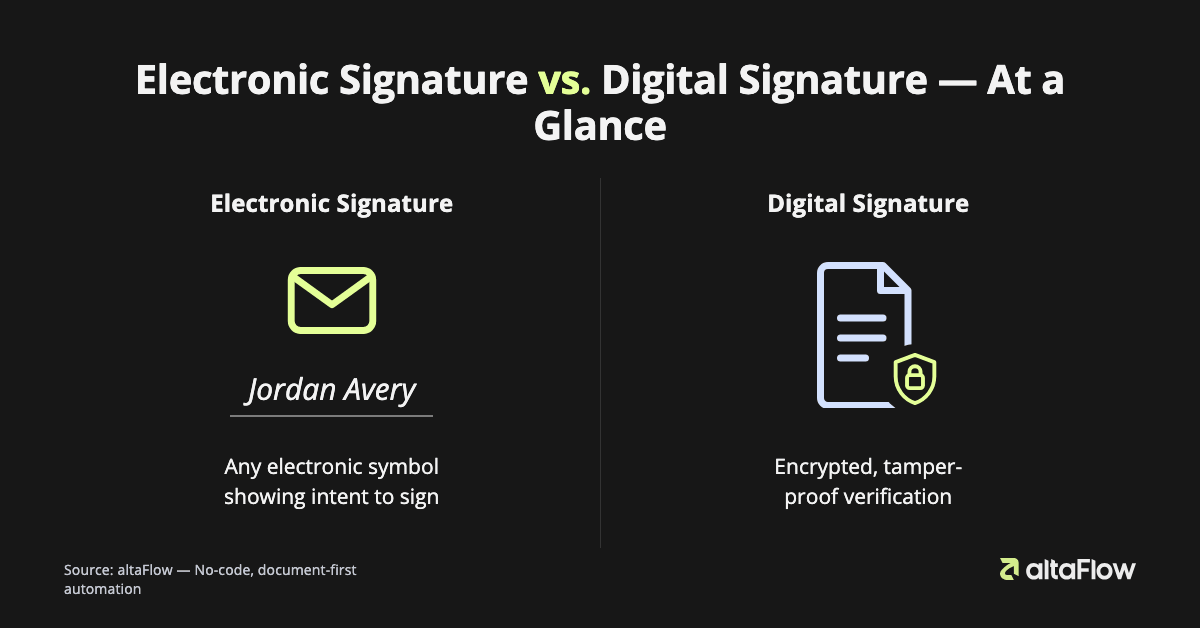
An electronic signature is any electronic symbol, sound, or process that a person uses to show intent to sign a document. A digital signature is a specific, cryptographically secured type of electronic signature that uses encryption to verify the signer's identity and confirm the document has not been altered.
Think of it this way: an electronic signature is like saying "I agree" by typing your name in an email. A digital signature is like sealing that email in a tamper-evident envelope with a unique wax seal that only you can make. If anyone tries to open it without your seal, the damage is immediately visible.
TL;DR: Key Facts Before You Read On
- All digital signatures are electronic signatures, but not all electronic signatures are digital. The distinction is technology and security depth.
- The electronic signature market is projected to reach USD 35.1 billion by 2029 (MarketsandMarkets, 2024).
- The digital signature market is projected to reach USD 43.1 billion by 2030 (Grand View Research, 2024).
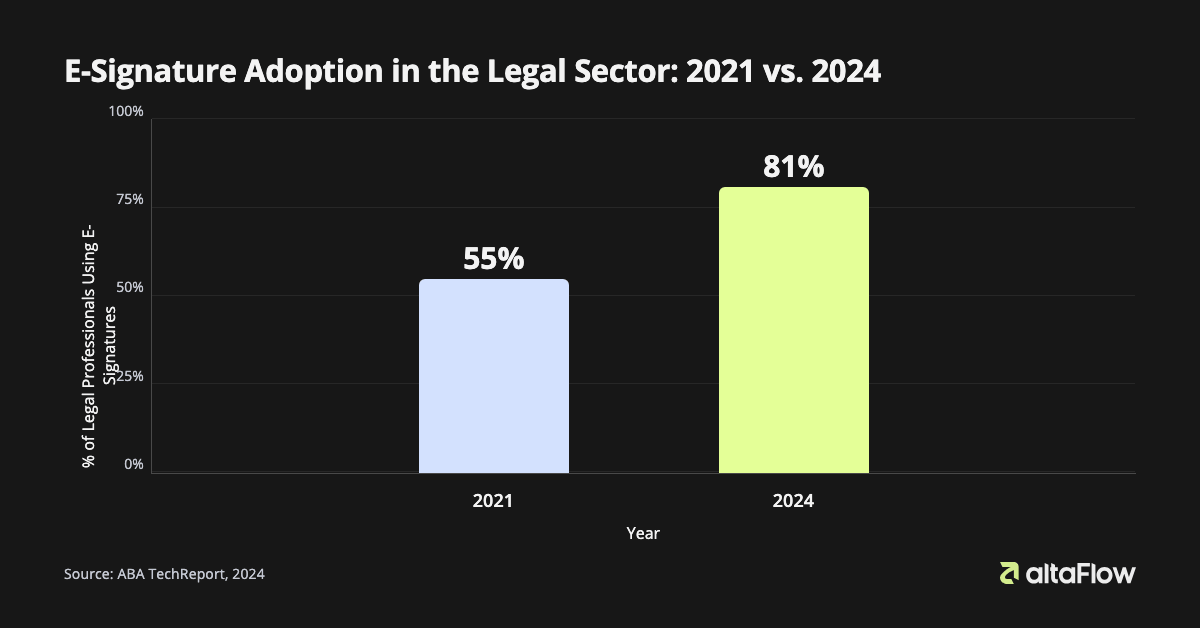
- In 2024, 81% of legal professionals reported using electronic signatures, up from 55% in 2021, a 47% increase in three years (ABA TechReport 2024).
- Organizations adopting e-signature technology report an average 8:1 ROI with a payback period of under three months (Forrester, 2024).
"While all digital signatures are electronic, not all electronic signatures are digital." Dr. Alisa Miller, Gartner, 2025
Why the Difference Between Electronic and Digital Signatures Matters for Your Business
Choosing the wrong signature type for a given transaction can expose your business to unenforceable contracts, failed audits, and regulatory penalties. The confusion is common, and costly.
Three specific pain points drive most of the risk:
- Jurisdiction and industry mismatches. Some regulated industries require higher-assurance signatures by law. Under the EU's eIDAS regulation, a Qualified Electronic Signature (QES) carries the same legal weight as a wet signature, but achieving QES status requires the cryptographic infrastructure of a digital signature, not just a typed name. Using a basic electronic signature where a QES is required can invalidate the document entirely.
- Remote identity verification gaps. When transactions happen remotely, whether loan applications, patient consent forms, or cross-border contracts, proving who actually signed is harder than it sounds. A simple electronic signature captures intent, but it may not capture enough evidence to hold up in a dispute. As David C. Whitaker of the ABA noted in 2024: "The technology used becomes paramount when you need to prove that intent and ensure the integrity of the record, which is where digital signature technology provides a much stronger evidentiary trail."
- Demand for higher-assurance signatures is accelerating. Gartner's 2025 research identified growing enterprise demand for signatures that go beyond basic intent capture, particularly in financial services, healthcare, and cross-border commerce. Organizations that built workflows around low-assurance signatures are now retrofitting them, which is significantly more expensive than getting the architecture right initially.
Getting this right also has a measurable upside. Forrester's 2024 research found that beyond the 8:1 ROI, organizations that implement well-structured signature workflows report improved compliance tracking, faster customer onboarding, and better employee experience. For teams running compliance workflow automation [link → site:altaflow.com compliance workflow automation], platforms like altaFlow provide a full audit trail for every document workflow, creating the evidentiary record that makes both electronic and digital signatures defensible.
How a Digital Signature Works: The Technology Behind the Tamper-Proof Seal
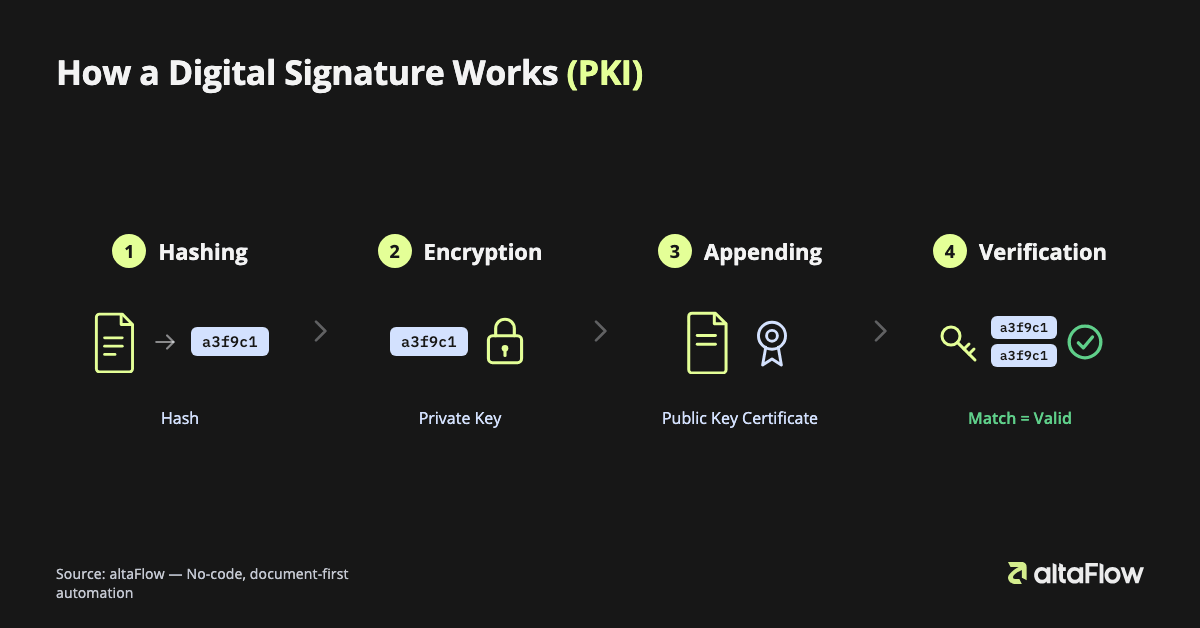
A digital signature works by generating a unique encrypted fingerprint of a document at the moment of signing, then locking that fingerprint with the signer's private key so that any subsequent change to the document breaks the seal. Here is the process, step by step.
Step 1: Hashing
The signing software takes the document and runs it through a mathematical algorithm that converts its entire contents into a short, fixed-length string of characters called a hash. The hash is unique to that exact version of the document. Change even a single comma, and the hash changes completely.
Step 2: Encryption
The hash is encrypted using the signer's private key, a secret cryptographic code that only the signer holds. The result is the digital signature itself: an encrypted block of data tied to both the signer and the document's exact state at signing.
Think of the private key as a one-of-a-kind stamp that only you own. When you press it into wax, it creates an impression no one else can replicate. The encrypted hash is that impression: proof the document came from you, locked at that exact moment.
Step 3: Appending
The encrypted hash and the signer's public key certificate, issued by a trusted Certificate Authority (CA), are attached to the document. The public key certificate is the signer's verified digital identity card.
Step 4: Verification
When the recipient opens the document, their software uses the signer's public key to decrypt the signature, revealing the original hash. The software then independently hashes the current version of the document. If the two hashes match exactly, the signature is valid: the document is authentic and unaltered. If they do not match, the document has been modified since signing.
This entire process is built on Public Key Infrastructure (PKI). As IEEE Access confirmed in 2024: "The security of digital signatures relies on cryptographic principles like public key infrastructure (PKI)." PKI is what separates a digital signature from a typed name. It provides mathematical proof, not just an assertion of intent.
Electronic Signature vs. Digital Signature: A Side-by-Side Comparison
The most common misconception is that "electronic signature" and "digital signature" are interchangeable terms. They are not. One is a legal category, the other is a technical implementation within that category.
| Feature | Electronic Signature | Digital Signature |
|---|---|---|
| Definition | Any electronic symbol, sound, or process used to indicate intent to sign a document | A specific type of electronic signature that uses PKI-based encryption to verify identity and document integrity |
| Underlying technology | None required. Can be a typed name, a checkbox, a scanned image, or a click | Requires Public Key Infrastructure (PKI), a Certificate Authority (CA), and cryptographic key pairs |
| Security level | Low to medium. Captures intent, but limited tamper evidence | High. Mathematically proves the signer's identity and detects any post-signing alteration |
| Identity verification | Typically relies on email address, IP address, or audit log | Verified by a trusted Certificate Authority; signer's identity is cryptographically bound to the document |
| Tamper evidence | None inherent. Document can be altered after signing without detection | Any change to the document after signing invalidates the signature automatically |
| Legal basis (US) | ESIGN Act (federal) and UETA (state level). Valid for most commercial transactions | Same legal basis, plus meets the higher technical standards required by eIDAS AES/QES, HIPAA, and 21 CFR Part 11 |
| Common use cases | Sales contracts, HR onboarding, NDAs, internal approvals, consent forms for low-risk transactions | Financial instruments, pharmaceutical records, cross-border contracts, regulated healthcare documents, government filings |
The practical implication: for the majority of everyday business agreements, a standard electronic signature is sufficient, legally valid, and faster to implement. For regulated industries or high-value transactions where the authenticity of the document may be challenged in court or by a regulator, a digital signature provides the evidentiary foundation that a basic electronic signature cannot.
Understanding the Legal Landscape: ESIGN, UETA, and eIDAS
Electronic signatures are legally valid in most jurisdictions worldwide, but the specific rules, and the signature assurance level required, vary significantly by region and industry.
United States: ESIGN Act and UETA
The Electronic Signatures in Global and National Commerce Act (ESIGN, 2000) establishes at the federal level that electronic signatures carry the same legal weight as handwritten signatures for most commercial and consumer transactions. The Uniform Electronic Transactions Act (UETA) provides the same framework at the state level and has been adopted by 49 states. Both laws focus on intent to sign as the core legal standard. They do not mandate any specific technology, which is why a typed name in an email can qualify as a valid electronic signature under US law.
European Union: eIDAS
The eIDAS regulation creates a tiered framework for electronic signatures across EU member states:
- Simple Electronic Signature (SES)
- The broadest category. Any electronic data attached to or associated with a document to indicate intent. A scanned signature image or a checkbox qualifies.
- Advanced Electronic Signature (AES)
- Must be uniquely linked to the signatory, capable of identifying them, created using data under the signatory's sole control, and linked to the signed data in a way that detects any subsequent change. AES typically requires digital signature technology.
- Qualified Electronic Signature (QES)
- An AES created by a qualified signature creation device and based on a qualified certificate for electronic signatures. A QES has the same legal effect as a handwritten signature across all EU member states. Achieving QES requires the full PKI infrastructure of a digital signature.
Industry-Specific Regulations
Beyond the foundational laws, several sector regulations impose additional requirements. HIPAA requires that electronic health records and patient consent workflows maintain data integrity and access controls that align with digital signature standards. The FDA's 21 CFR Part 11 governs electronic records and signatures in pharmaceutical and biotech environments, requiring audit trails, access controls, and signature manifestations that go well beyond a basic electronic signature. For teams managing HIPAA-compliant document workflows [link → site:altaflow.com compliance workflow automation], altaFlow is certified compliant with HIPAA, GDPR, SOC 2 Type II, PCI DSS, FERPA, and CCPA, meaning the platform's underlying infrastructure meets the security standards these regulations require.
The practical takeaway: if your business operates in the EU, healthcare, or pharmaceuticals, the regulatory floor for signature assurance is higher than ESIGN alone provides. Mapping your document types to the appropriate signature tier before building workflows saves significant rework later.
Who Uses Electronic Signatures and When? Real-World Scenarios
Virtually every industry uses electronic signatures to replace paper-based processes, but the specific signature type, workflow design, and compliance requirements differ significantly by sector. The financial services sector [link → search: IDC electronic signature market financial services 2024] is projected to hold the largest share of the e-signature market through the end of the decade (IDC, 2024), driven by the volume and legal sensitivity of the documents involved.
Scenario 1: RevOps Team at a Financial Services Firm (Quote-to-Cash Automation)
Who: A RevOps manager at a mid-market financial services company. What: Automates the entire quote-to-cash cycle, from generating a proposal in Salesforce to routing it for internal discount approval to collecting the customer's electronic signature. Where: The workflow runs inside Salesforce; the signed contract auto-attaches to the opportunity record. When: Triggered the moment a sales rep marks a deal as "ready to send." Why: Manual quote processes averaged three to five days; the automated workflow closes that loop in under two hours. How: Using altaFlow's Quote-to-Cash automation, the platform generates the document from CRM data, routes it through conditional approval logic, captures the electronic signature, and syncs the signed document back to Salesforce, with no manual steps required.
Scenario 2: Healthcare Compliance Officer (Patient Consent and Regulated Records)
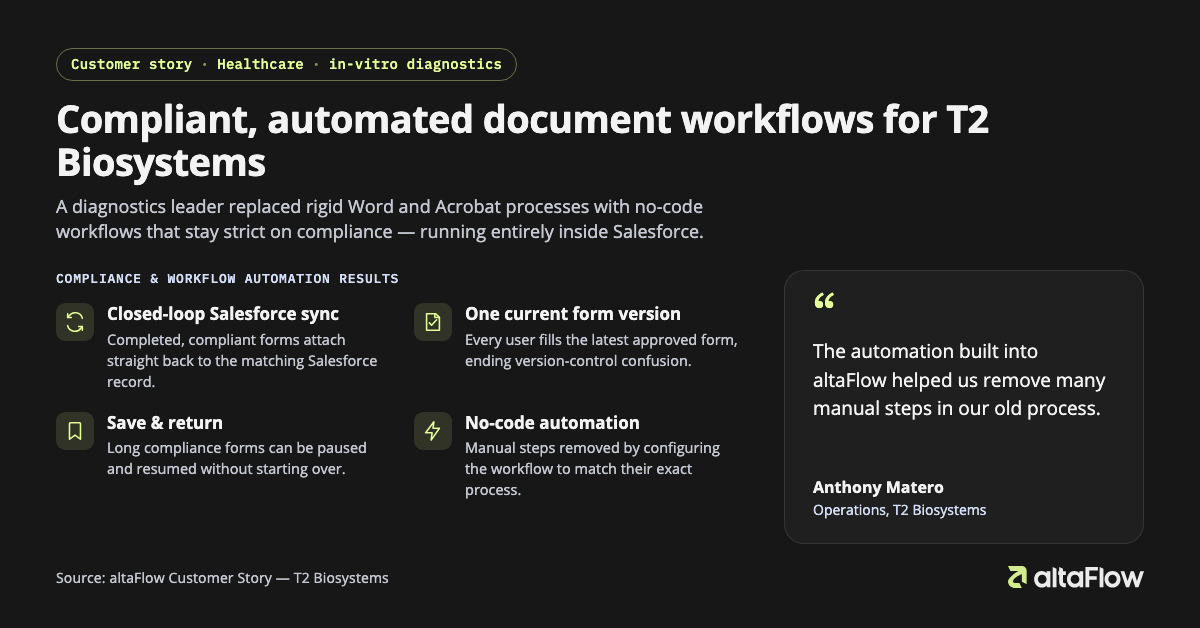
T2 Biosystems, a healthcare technology company, used altaFlow to automate critical document workflows that required both compliance rigor and Salesforce integration. Mandy Hoffman, Business Operations Manager at T2 Biosystems, described the outcome: "Compliance audits, which once took weeks, are now completed in days. This level of efficiency and security gives us confidence in scaling." For healthcare workflows requiring HIPAA compliance, the platform's full audit trail and HIPAA-compliant workflow automation ensure that every signing action is logged, timestamped, and attributable, meeting the evidentiary standard that patient consent records require.
Scenario 3: HR Manager (Digital Employee Onboarding)
An HR manager at a growing company sends a single digital onboarding packet to a new hire: W-4, I-9, HRIS enrollment form, and employee handbook acknowledgment, all pre-filled from the HRIS with the hire's known data. The new hire completes and signs everything on a mobile device before their first day. The employee onboarding document workflow auto-routes completed forms to the appropriate HR records system, eliminating the manual filing step entirely. altaFlow's HR solution is purpose-built for exactly this use case, described on the platform as: "Send a single digital packet for HRIS, W-4, and handbook that guides new hires through every step."
Scenario 4: Legal Team (NDA and Contract Standardization)
A legal operations team standardizes NDA generation and contract review workflows so that every agreement follows firm policy before it reaches a signer. Contract generation and approvals [link → site:altaflow.com contract generation approvals] are automated through conditional routing logic. Low-risk NDAs route directly to the counterparty for signature, while contracts above a threshold dollar value route to General Counsel first. Every version is tracked, every approval is logged, and the signed document is stored in the designated repository automatically.
The Business Benefits of Adopting Modern Signature Workflows
Adopting electronic signature workflows delivers measurable outcomes across speed, cost, compliance, and employee experience. The data below comes from organizations that have made the transition.
8:1 average ROI, payback in under three months
Forrester's 2024 Total Economic Impact of e-signature solutions found that organizations adopting e-signature technology report an average return of eight dollars for every one dollar invested, with full payback in fewer than 90 days.
Document turnaround drops from days to minutes
The same Forrester research found that average time to collect a signature falls from multiple business days to hours or minutes, a change that directly accelerates revenue recognition for sales teams and reduces processing backlogs for HR and legal.
Up to 85% reduction in document handling costs
Switching from paper-based document processes to electronic workflows can reduce handling costs by up to 85% (AIIM, 2023, supplementary context; verify against current benchmarks before citing in regulated reporting).
Improved employee productivity
Forrester identified improved employee productivity as a consistent quantifiable benefit, driven by the elimination of manual printing, scanning, filing, and follow-up tasks that consume significant time in paper-based workflows.
Compliance tracking built into every transaction
Unlike paper processes, electronic signature workflows generate a time-stamped, role-attributed audit record automatically. For teams subject to HIPAA, GDPR, or SOC 2 audits, this transforms audit preparation from a weeks-long manual exercise into a report that can be generated on demand.
For organizations looking to capture these outcomes, altaFlow's no-code document workflow automation is designed to deliver quick wins on day one, with measurable operational impact in under 90 days. The platform's site-license pricing model, with no per-user seat limits, no envelope caps, and no hidden line items, means the cost structure scales predictably as transaction volume grows.
Frequently Asked Questions
Is a digital signature more secure than an electronic signature?
Yes, in most practical scenarios. A digital signature uses Public Key Infrastructure (PKI) to cryptographically bind the signer's verified identity to the document and to detect any post-signing alteration. A basic electronic signature, such as a typed name or a checkbox, captures intent but does not provide the same mathematical proof of authenticity or tamper detection. For low-risk, everyday agreements, a standard electronic signature is sufficient. For regulated transactions or high-value contracts where the document may be challenged, a digital signature provides a significantly stronger evidentiary record.
Are electronic signatures legally binding in the United States?
Yes. The ESIGN Act (federal) and UETA (adopted by 49 states) establish that electronic signatures carry the same legal weight as handwritten signatures for most commercial and consumer transactions. The core legal standard is intent to sign, not the technology used to capture that intent. Certain document types are explicitly excluded, including wills, testamentary trusts, and some court orders. For the vast majority of business contracts, NDAs, HR documents, and financial agreements, a properly captured electronic signature is fully enforceable.
What are the three types of electronic signatures under eIDAS?
The eIDAS regulation defines three tiers. A Simple Electronic Signature (SES) is the broadest category, meaning any electronic data indicating intent, such as a scanned image of a handwritten signature. An Advanced Electronic Signature (AES) must be uniquely linked to the signer, capable of identifying them, and connected to the signed data in a way that detects subsequent changes, typically requiring digital signature technology. A Qualified Electronic Signature (QES) is an AES created by a qualified signature creation device with a certificate from an accredited Certificate Authority; it has the same legal effect as a handwritten signature across all EU member states.
Can an email be used as an electronic signature?
Under US law (ESIGN and UETA), yes, in many circumstances. Typing your name at the bottom of an email, or sending an email that clearly indicates your agreement to specific terms, can constitute a valid electronic signature if the intent to sign is clear and the parties have agreed to conduct the transaction electronically. However, an email alone typically lacks an audit trail, identity verification, and tamper evidence, which makes it difficult to defend if the agreement is disputed. For any transaction where enforceability matters, a dedicated electronic signature capture [link → site:altaflow.com electronic-signature] workflow with a full audit trail is the more defensible approach.
What industries are required to use higher-assurance signatures?
Healthcare (HIPAA, 21 CFR Part 11), financial services (various SEC and FINRA requirements), pharmaceutical and biotech (FDA 21 CFR Part 11), and EU-regulated sectors (eIDAS AES/QES requirements) are the most commonly affected. Government contracting and cross-border commercial transactions also frequently require digital signature-level assurance. In these contexts, the signature must not only capture intent but also verify identity through a Certificate Authority and provide mathematical proof that the document has not been altered since signing.
Glossary of Key Terms
- Audit Trail
- A chronological, tamper-evident log of every action taken on a document, including who viewed it, who signed it, when, and from what IP address. Platforms like altaFlow provide a full audit trail [link → site:altaflow.com audit trail workflow] for every document workflow, making signed records audit-ready for HIPAA, SOC 2, and GDPR reviews.
- Certificate Authority (CA)
- A trusted third-party organization that issues digital certificates verifying the identity of a signer. When a CA issues a certificate, it is asserting that the public key in the certificate belongs to the named individual or organization. Examples include DigiCert, GlobalSign, and government-accredited CAs under eIDAS.
- eIDAS
- The EU Regulation on Electronic Identification, Authentication and Trust Services (eIDAS, Regulation No. 910/2014). It establishes a legal framework for electronic signatures across EU member states, defining three tiers (SES, AES, and QES) and giving QES the same legal standing as a handwritten signature throughout the EU.
- ESIGN Act
- The Electronic Signatures in Global and National Commerce Act, enacted by the US Congress in 2000. It establishes that electronic signatures are legally valid for most commercial transactions in the United States and cannot be denied legal effect solely because they are in electronic form.
- Hashing
- A cryptographic process that converts a document's contents into a fixed-length string of characters (the hash). The same document always produces the same hash; any change to the document produces a completely different hash. In digital signatures, hashing is used to create a unique fingerprint of the document at the moment of signing.
- Public Key Infrastructure (PKI)
- The system of cryptographic keys, digital certificates, and Certificate Authorities that underpins digital signatures. PKI uses a key pair, a private key known only to the signer and a public key shared with recipients, to encrypt and verify signatures. As IEEE Access confirmed in 2024, PKI is the foundational cryptographic principle that makes digital signatures mathematically verifiable and tamper-evident.
Move Beyond Signatures with End-to-End Workflow Automation
The core distinction is straightforward: use standard electronic signatures for low-risk, everyday agreements where intent to sign is the primary legal requirement. Use digital signatures, or platforms that provide the underlying security controls, for regulated transactions, high-value contracts, or any document where you may need to prove authenticity in a dispute or audit.
But the signature itself is one step in a longer process. The documents still need to be generated, pre-filled with accurate data, routed to the right approvers, and stored in the right systems after signing. Each of those steps, done manually, reintroduces the errors, delays, and compliance gaps that e-signatures are meant to eliminate.
altaFlow is built around the full document lifecycle: document generation from CRM and ERP data, dynamic smart forms that capture clean data before the document is created, electronic signature capture with a complete audit trail, and no-code automation bots that handle routing, approvals, notifications, and CRM sync, without requiring any API development. For organizations evaluating their options, altaFlow's site-license pricing runs approximately 30% below comparable standalone e-signature platforms, and it covers the entire document workflow in a single platform rather than requiring separate tools for each stage.
To see how this works in practice, altaFlow document workflow automation is a good starting point, or request a demo to walk through a workflow built around your specific document types and compliance requirements.
Sources
- MarketsandMarkets. Digital Signature Market Report, 2024 [check: source figure differs from the stat used in post]
- Grand View Research. Digital Signature Market Size & Trends, 2024 [check: source figure differs from the stat used in post]
- American Bar Association. ABA TechReport 2024 [verify: 81% / 55% e-signature figures not found in public summary]
- Forrester. Total Economic Impact of E-Signature Solutions, 2024 [citation pending: no verifiable public report URL]
- Gartner. Electronic Signature Market Trends, 2025 [verify: named analyst attribution could not be confirmed]
- IEEE Access. Security of Digital Signatures and PKI, 2024 [citation pending: needs a verifiable DOI / IEEE Xplore URL]
- IDC. Worldwide eSignature Software Forecast, 2023-2027
- AIIM. Digital Signatures 101, document handling research [verify: 85% figure not stated in source]
- European Commission. eIDAS Regulation (EU) No 910/2014
- FTC. ESIGN Act Report to Congress