

Your sales rep closed a deal on Tuesday. By Wednesday, the contract request sat in Legal's shared inbox. On Thursday morning, someone attached the wrong template from the shared drive.
By Friday, the approver who needed to sign off was out of office, and no one else had authority to move it forward. Monday arrived, and the rep was fielding questions from the buyer about where the contract was. That slow path is the default when your contract management software doesn't connect to Salesforce. Here are six platforms that do, ranked by how deep the integration goes.
Quick guide: 6 best CLM software options with Salesforce integration
- altaFlow: contract lifecycle management (CLM) for Salesforce teams that need governed document automation, built-in eSignature, and bi-directional customer relationship management (CRM) sync on one no-code platform.
- DocuSign CLM: enterprise-focused contract lifecycle platform with redlining and a clause library for organizations already using the DocuSign eSignature ecosystem.
- Conga CLM: Salesforce-native contract management with AI-assisted redlining for legal teams that run their entire data model inside Salesforce.
- PandaDoc: document creation and configure, price, quote (CPQ) tool with a Salesforce connector for revenue teams focused on proposals, quotes, and shorter-cycle agreements.
- Adobe Acrobat Sign: signature-focused platform with Salesforce field mapping and data sync for teams that primarily need eSignature with basic routing.
- Box Sign: content management platform with signature capabilities for organizations that store contracts in Box and need a Salesforce-connected signing option.
How we chose the best CLM software for Salesforce teams
Contracts carry both your Salesforce data and your legal obligations. A CLM platform needs to do more than store agreements. It needs to keep your CRM current, your approvals governed, and your audit trail intact. Here's what we evaluated.
- Bi-directional Salesforce sync: Can data flow from Salesforce into the contract and write back after signature, so your CRM stays accurate without re-keying?
- Governed approval routing: Does the platform support multi-step, conditional approvals with escalation paths, or does routing depend on people checking inboxes?
- Built-in eSignature: Is eSignature part of the workflow, or does it require a separate tool and a separate license?
- No-code configurability: Can your operations team build and modify workflows without filing IT tickets or writing Apex code?
- Audit trail and compliance: Does every action, approval, and signature produce an immutable, timestamped record your compliance team can use?
- Document generation from CRM data: Can the platform pull live Salesforce fields into templates with conditional logic, eliminating manual data entry?
- Total cost of ownership: Does the pricing model include all the capabilities you need, or does each add-on increase your per-user cost?
The 6 best CLM software options for Salesforce teams
1. altaFlow: Salesforce-connected contract automation on one platform
altaFlow approaches contract lifecycle management differently from most CLM platforms. Instead of treating the contract as an isolated document that happens to connect to Salesforce, altaFlow treats the Salesforce record as the starting point for every contract workflow.
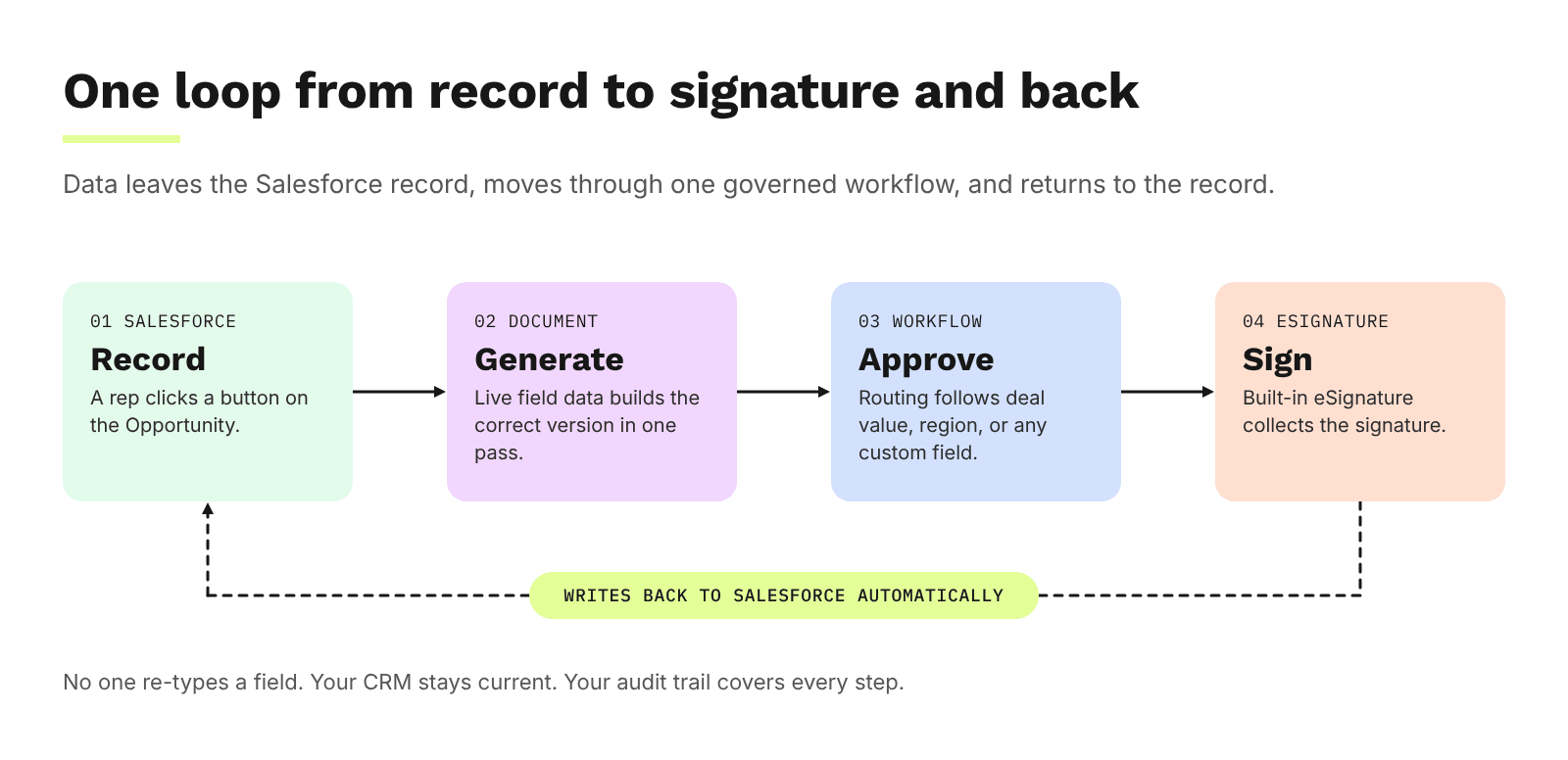
A rep clicks a button on the Opportunity. altaFlow pulls live field data into the contract template using conditional logic and dynamic tables, building the correct version in one pass.
The contract routes through a governed, multi-step approval chain based on deal value, region, or any custom field. When it's ready, built-in eSignature collects the signature and the completed document writes back to the Salesforce record automatically.
That closed loop is what altaFlow calls the record-to-document-to-record loop. Data leaves the record, enters the document, moves through a governed workflow, and returns to the record. No one re-types a field. Your CRM stays current. Your audit trail covers every step.
For legal and revenue operations teams at mid-market and enterprise organizations, the alternative is a stack of disconnected tools: one for document generation, one for approvals, one for eSignature, and manual effort to sync the results back.
altaFlow consolidates that stack into a single, no-code platform with governed approval workflows, role-based access controls, and enterprise-grade security.
altaFlow features
- Dynamic document generation: Pull data from any Salesforce object, including custom objects, into templates with conditional logic and dynamic tables. You maintain one template instead of hundreds of near-duplicates.
- Governed approval routing: Design multi-step approval workflows visually with conditional logic, automatic escalation, and service level agreement (SLA) tracking. No Apex code required.
- Built-in eSignature: Legally binding eSignature is embedded in every workflow. Define signing order, set automated reminders, and collect signatures without leaving the platform.
- Bi-directional Salesforce sync: Completed documents, status updates, dates, and file links write back to Salesforce automatically, keeping your CRM as the single source of truth.
- No-code workflow builder: Operations and legal teams configure everything through drag-and-drop interfaces. No developer dependency, no IT backlog.
- Immutable audit trail: Every action, approval, signature, and data change is logged with timestamps. Your compliance team gets a tamper-proof record for SOC 2, Health Insurance Portability and Accountability Act (HIPAA), and General Data Protection Regulation (GDPR) readiness.
altaFlow pros and cons
Pros:
- Unifies document generation, approval routing, eSignature, and CRM sync on one platform, reducing total cost of ownership compared to multi-tool stacks.
- altaFlow customers reduce contract cycle time 40%+, so contracts move from request to signature faster and revenue recognition comes sooner.
- No-code configuration means your operations team owns the process. Changes happen in hours, not weeks of IT tickets.
Cons:
- Teams that only need standalone eSignature without workflow automation may find the full platform broader than their immediate use case.
- Organizations running complex enterprise resource planning (ERP) first contract processes may need additional configuration time to map all data flows during initial setup.
- The visual workflow builder is designed for document-centric processes, so use cases outside document workflows may require complementary tooling.
2. DocuSign CLM: enterprise contract lifecycle tooling for Salesforce
DocuSign CLM offers Salesforce integration that generates agreements from pre-defined templates using Salesforce data. The platform includes redlining, version control, and a clause library where legal teams manage pre-approved language. Admins configure workflows in a visual builder inside Salesforce.
The platform is available globally and runs on both Salesforce Lightning and Classic. DocuSign CLM includes a central agreement repository for storing and searching contracts. Approval routing is configurable, and integration with DocuSign eSignature is available as a connected product.
DocuSign CLM features
- Clause library: Legal teams maintain pre-approved standard and fallback clauses that users insert during contract creation, maintaining consistency.
- Centralized redlining: Negotiation happens in one place with tracked changes and version history, so legal teams can review all modifications.
- Agreement repository: DocuSign stores contracts centrally within Salesforce with full-text search across terms, metadata, and clauses.
DocuSign CLM pros and cons
Pros:
- The clause library gives legal teams granular control over approved contract language.
- Redlining and version control happen in a centralized interface connected to Salesforce records.
- The platform has broad regional availability across North America, EMEA, APAC, and LATAM.
Cons:
- eSignature is a separate product that requires its own license, so the total platform cost includes multiple subscriptions.
- Configuration for complex, multi-step approval chains may require admin training beyond the standard setup.
- Document generation capabilities are template-based without native conditional logic that adapts dynamically to Salesforce field values.
3. Conga CLM: Salesforce-native contract management with AI redlining
Conga CLM runs directly on the Salesforce platform, storing all contract data within Salesforce objects. The platform includes artificial intelligence (AI) assisted redlining that flags language against playbooks, a contract wizard for self-service generation, and authority matrix delegation for approvals. Conga's October 2026 release introduced a Model Context Protocol server that connects CLM to external AI assistants.
Because Conga CLM's data model lives entirely inside Salesforce, organizations already invested in Salesforce's data architecture may find the reporting and analytics layer familiar. The platform integrates with eSignature providers like DocuSign and Adobe Acrobat Sign rather than offering a native signing capability.
Conga CLM features
- AI-powered redlining: The Redline AI feature marks up contracts against your playbooks, flagging favorable and unfavorable language with one-click accept or reject.
- Authority matrix delegation: Approval workflows include out-of-office delegation so contracts don't stall when an approver is unavailable.
- Self-service contract wizard: Business users generate contracts through guided wizards without waiting on legal for routine agreements.
Conga CLM pros and cons
Pros:
- Runs natively on the Salesforce platform, so contract data lives inside the same objects your sales team already uses.
- AI-assisted redlining automates parts of the review process that typically require manual legal attention.
- The authority matrix includes out-of-office delegation, addressing a common approval bottleneck.
Cons:
- eSignature requires a third-party integration with DocuSign or Adobe Acrobat Sign, adding a separate tool to the workflow.
- The platform is built specifically for Salesforce, so organizations with multi-CRM environments need to evaluate compatibility.
- Configuration of complex workflows within the Salesforce admin interface may require dedicated Salesforce admin resources.
4. PandaDoc: document creation and CPQ with a Salesforce connector
PandaDoc focuses on document creation, proposals, and quoting with a Salesforce integration that syncs data bi-directionally between the two systems. The platform includes a CPQ module for Salesforce that automates pricing, approvals, and contract generation. Two-way sync updates Opportunity status and fields when document status changes in PandaDoc.
The Salesforce integration is available as a paid add-on for Business Annual and Enterprise Annual plans. PandaDoc supports standard Salesforce objects including Opportunities, Leads, Contacts, Accounts, and custom objects. Full two-way sync requires the Salesforce Enterprise edition or Professional with the API Access add-on.
PandaDoc features
- CPQ for Salesforce: Automates pricing rules, product configuration, and conditional approvals for quotes generated within Salesforce.
- Two-way data sync: Document status updates in PandaDoc trigger Salesforce Opportunity field updates, keeping both systems current.
- Template-based document creation: Users create proposals, quotes, and contracts from templates populated with Salesforce record data.
PandaDoc pros and cons
Pros:
- The CPQ module combines pricing, configuration, and document generation in a single interface within Salesforce.
- Two-way sync keeps Salesforce Opportunity fields updated when document statuses change.
- Users can create documents from standard and custom Salesforce objects.
Cons:
- The Salesforce integration is a paid add-on, not included in base plans.
- Full two-way sync requires Salesforce Enterprise edition or Professional with the API Access add-on, limiting some deployments.
- The platform does not offer native governed approval routing with conditional escalation logic for multi-step contract approvals.
5. Adobe Acrobat Sign: signature-focused platform with Salesforce data mapping
Adobe Acrobat Sign provides eSignature functionality with a Salesforce integration that maps Salesforce fields into documents and syncs signed data back to CRM records. The platform supports merge mapping, data mapping, and approval routing within Salesforce. It works with Sales Cloud, Service Cloud, and Experience Cloud.
The integration is Lightning-ready and installs as a managed package. Adobe Acrobat Sign focuses on the signature step of the contract process, with document generation handled through Salesforce merge mapping or separate document creation tools.
Adobe Acrobat Sign features
- Salesforce data mapping: Fields from signed documents map back to Salesforce records without coding, keeping CRM data accurate post-signature.
- Merge mapping: Salesforce object data populates into documents before sending for signature, reducing manual entry.
- Multi-cloud support: The integration works across Sales Cloud, Service Cloud, and Experience Cloud.
Adobe Acrobat Sign pros and cons
Pros:
- Data mapping writes signed document fields back to Salesforce records without requiring custom development.
- The managed package installs directly in Salesforce and supports both Lightning and Classic interfaces.
- Multi-cloud support covers Sales Cloud, Service Cloud, and Experience Cloud.
Cons:
- The platform focuses on eSignature and does not include native contract lifecycle management capabilities like redlining, version control, or obligation tracking.
- Document generation relies on Salesforce merge mapping rather than a dedicated template engine with conditional logic.
- Governed approval routing with multi-step conditional logic and automatic escalation is not available as a built-in feature.
6. Box Sign: content management with Salesforce-connected signing
Box Sign adds eSignature capabilities to the Box content management platform with a Salesforce integration. Users can generate documents from Salesforce data using Box Sign Templates, send them for signature, and automatically store signed files in the Box folder linked to the Salesforce record. The integration supports serial and parallel document routing.
Box Sign Templates allow admins to predefine documents, recipients, signing order, and email settings for recurring workflows. Signed documents maintain a complete audit trail within Box. The platform integrates with Salesforce Flow for automating downstream actions after signature.
Box Sign features
- Template-based signing: Predefine documents, recipients, signing order, and email settings for recurring agreements like non-disclosure agreements (NDAs) and onboarding forms.
- Automatic file storage: Box stores signed documents and signing logs in the folder linked to the Salesforce record.
- Salesforce Flow automation: Salesforce Flow automates post-signature actions, connecting signing to downstream processes.
Box Sign pros and cons
Pros:
- Organizations already using Box for content management get eSignature functionality within their existing storage system.
- Box stores signed documents and audit logs automatically in the associated Salesforce record's Box folder.
- Support for serial and parallel routing covers basic multi-party signing scenarios.
Cons:
- The platform does not include contract lifecycle management features such as redlining, clause libraries, or obligation management.
- Governed approval routing with conditional logic and automatic escalation is not available natively within Box Sign.
- Document generation is limited to template-based field population without the dynamic conditional logic needed for complex contracts.
Comparison table: the best CLM software for Salesforce teams
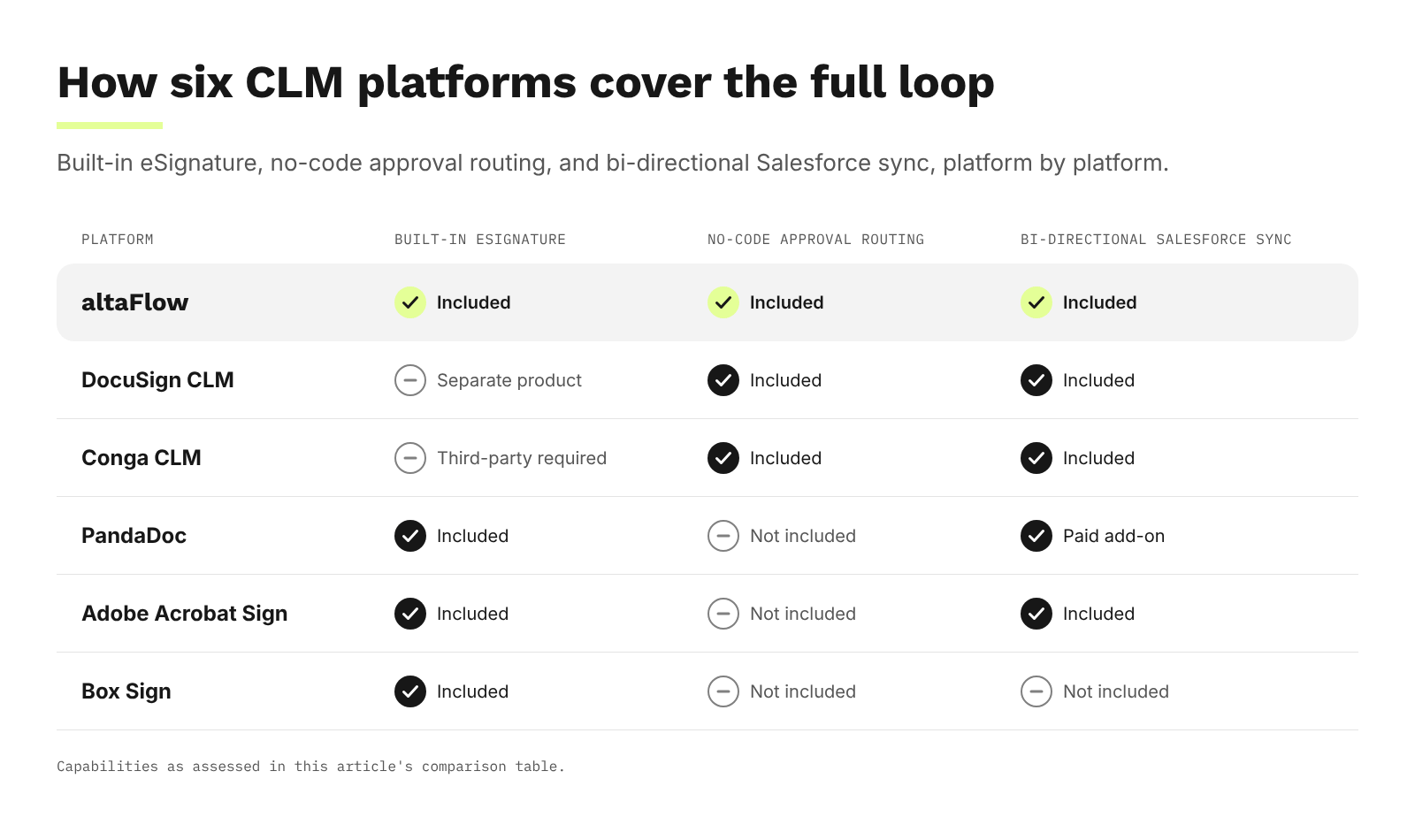
| Platform | Built-in eSignature | No-code approval routing | Bi-directional Salesforce sync |
|---|---|---|---|
| altaFlow | Yes | Yes | Yes |
| DocuSign CLM | No (separate product) | Yes | Yes |
| Conga CLM | No (third-party required) | Yes | Yes |
| PandaDoc | Yes | No | Yes (paid add-on) |
| Adobe Acrobat Sign | Yes | No | Yes |
| Box Sign | Yes | No | No |
How does contract automation reduce cycle time for Salesforce teams?
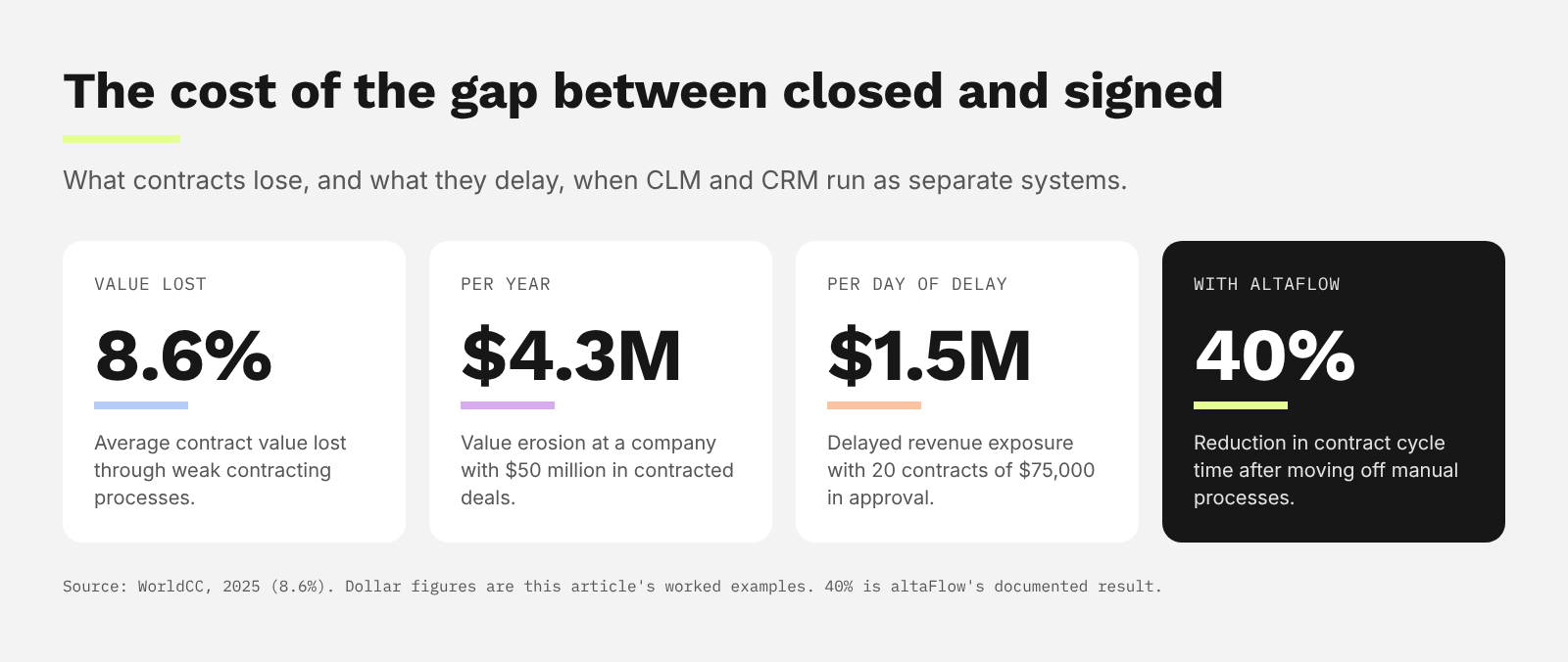
Contract cycle time measures the gap between a contract request and a completed, signed agreement. Every day in that gap is delayed revenue. According to WorldCC research published in 2025, organizations lose an average of 8.6% of contract value through weaknesses in their contracting processes.
The delay typically accumulates at predictable failure points: manual document assembly from the wrong template, routing that depends on someone checking their inbox, no escalation when an approver is out of office, and manual re-keying of signed data back into Salesforce. Each of these is a structural gap, not a people problem.
altaFlow addresses each failure point directly. Document generation from Salesforce data eliminates manual assembly. Governed routing with conditional logic and automatic escalation removes inbox dependency. Built-in eSignature keeps the contract in the same workflow. Automatic write-back closes the loop. Teams that move from manual processes to altaFlow reduce contract cycle time 40%+.
Why Salesforce teams choose altaFlow
Most CLM platforms connect to Salesforce. altaFlow closes the record-to-document-to-record loop. That distinction matters when you're responsible for contract velocity, compliance, and cost.
You get document generation, governed approval routing, legally binding eSignature, and bi-directional CRM sync on a single no-code platform through altaFlow's Salesforce integration. Your legal team gets immutable audit trails covering every action. Your operations team builds and modifies workflows without IT dependency. And your finance team sees a 3 to 1 tool consolidation at 30% lower cost than DocuSign, Conga, and PandaDoc.
If your contracts currently run through disconnected tools with manual handoffs between Salesforce and your signing platform, the cost of that fragmentation is measurable. altaFlow gives your team a governed, no-code infrastructure where every contract follows the same reliable path from record to signature and back. Request a demo
FAQs about Salesforce CLM software
What is CLM software with Salesforce integration?
CLM software with Salesforce integration manages the full contract lifecycle, from creation through signature and renewal, while syncing data with your Salesforce CRM. altaFlow takes this further by generating contracts directly from Salesforce records, routing them through governed approvals, and writing results back automatically.
Can altaFlow replace multiple contract tools?
Yes. altaFlow consolidates document generation, approval routing, eSignature, and CRM sync into one platform. Teams using separate tools for each of those steps see a 3 to 1 tool consolidation, lowering licensing costs and eliminating manual data transfers between systems.
Do I need coding skills to set up contract workflows in altaFlow?
No. altaFlow's drag-and-drop no-code workflow builder lets operations and legal teams configure approval chains, conditional routing, and document templates without writing code. Changes go live in hours, not weeks.
How does altaFlow handle compliance and audit trails?
Every action in altaFlow produces a timestamped, immutable audit record. This includes document creation, edits, approvals, rejections, signature events, and data write-backs to Salesforce. The platform supports SOC 2, HIPAA, and GDPR readiness with role-based access controls and encryption.
Which Salesforce objects does altaFlow support?
altaFlow supports all standard and custom Salesforce objects, including Opportunity, Quote, Account, Contract, Order, and Case. Workflows can launch from any object and write data back to any field, keeping your CRM as the single source of truth.
